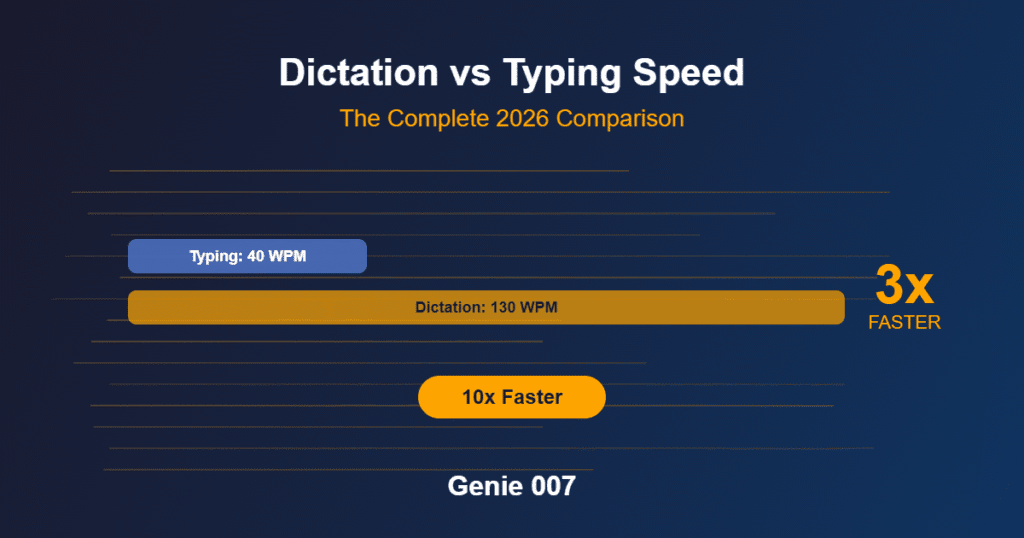
How fast do you type? The average professional types at 40 words per minute. Some reach 60–80 with practice. The fastest typists in the world peak around 150–170 WPM in controlled bursts — but sustained professional typing rarely exceeds 60 WPM even for experienced writers. Now consider this: the average person speaks at 130–150 words per minute naturally, without training, without practice, and without effort. That’s a 3x speed advantage that’s built into how humans communicate. Dictation vs typing speed isn’t a close comparison — speaking is fundamentally faster than typing for almost everyone, and the gap widens when you account for the cognitive overhead of keyboard use. This guide breaks down the real numbers, the research behind them, what the speed difference means for daily productivity, and how to capture that speed advantage using modern voice typing tools.
Whether you’re a writer who produces thousands of words daily, a sales professional who lives in email and CRM, a manager who communicates across dozens of messages per day, or anyone who spends significant time typing, understanding the voice typing speed wpm comparison helps you make an informed decision about how you input text — and potentially reclaim hours every week.
Dictation vs Typing Speed: The Real Numbers
The dictation vs typing speed debate has a clear winner — but most people haven’t made the switch yet. Let’s start with the data. Typing and speaking speeds have been measured extensively across multiple studies, and the results are consistent.
Average Typing Speeds: Dictation vs Typing Speed Baseline
The median typing speed for adults is approximately 40 words per minute with 92–98% accuracy. This figure comes from studies of general adult populations and includes both hunt-and-peck typists and touch typists. For professionals who type daily as part of their job — office workers, writers, programmers, customer support agents — the average rises to 50–65 WPM. Professional transcriptionists and court reporters, who represent the upper tier of typing speed, typically sustain 80–100 WPM.
These numbers include only the mechanical act of pressing keys. They don’t account for the time spent thinking about what to write, correcting errors, reformatting text, or switching between applications. When you measure the actual rate at which finished, usable text appears — what researchers call “effective throughput” — the numbers drop significantly. A person typing at 50 WPM who pauses to think, corrects three errors per sentence, and reformats occasionally might produce finished text at an effective rate of 25–35 WPM.
Typing speed also degrades with complexity. Simple, familiar phrases flow quickly. Technical content with specialised vocabulary, numbers, and precise phrasing slows most typists to 30–40% below their peak speed. Composing original content (as opposed to transcribing existing text) reduces effective speed further, because the brain must simultaneously compose thoughts and coordinate finger movements — a dual-task that creates cognitive bottleneck.
Average Speaking Speeds in the Dictation vs Typing Speed Race
The average English-speaking adult speaks at 130–150 words per minute in natural conversation. This speed is remarkably consistent across populations — whether you’re explaining a project update to a colleague, describing your weekend to a friend, or presenting in a meeting, your speaking pace falls within this range without conscious effort.
For dictation specifically, studies show slightly lower speeds than free conversation: 100–130 WPM for people new to voice typing, rising to 130–150 WPM within a few days as they become comfortable with the process. A 2025 multi-country clinical study measuring both typing and dictation across 72 accents found a median dictation speed of 93 WPM against a median typing speed of 21.5 WPM — a 4.3x speed advantage for dictation, even among first-time users in a clinical setting rather than their natural work environment.
The speaking speed advantage is even more pronounced for complex content. When you’re typing a detailed technical explanation, your typing speed drops because each word requires precise finger coordination. When you’re speaking the same explanation, your speed stays constant — the complexity of the content doesn’t slow your mouth the way it slows your fingers. Is dictation faster than typing? For complex, original content, the speed advantage of speaking over typing expands from 3x to 4x or more.
Dictation vs Typing Speed: Real-World Comparison
Here’s how the dictation vs typing speed difference plays out in practical terms for common work tasks:
A standard email reply (75 words): Typing at 50 WPM takes 90 seconds. Speaking at 130 WPM takes 35 seconds. Time saved: 55 seconds per email. Across 40 emails per day, that’s 37 minutes recovered.
A meeting summary (300 words): Typing at 45 WPM (slower due to composition) takes 6.7 minutes. Speaking at 130 WPM takes 2.3 minutes. Time saved: 4.4 minutes per summary. For someone who writes five meeting summaries per week, that’s 22 minutes recovered weekly.
A project report (2,000 words): Typing at 40 WPM (further slowed by technical content) takes 50 minutes. Speaking at 120 WPM takes 17 minutes. Time saved: 33 minutes per report. For weekly reports, that’s over two hours per month.
A full day of professional communication (5,000 words across emails, messages, documents, and notes): Typing at 45 WPM effective rate takes 111 minutes (1.85 hours). Speaking at 125 WPM takes 40 minutes. Time saved: 71 minutes per day, or nearly six hours per week.
Beyond Dictation vs Typing Speed: Why Voice Produces Better Output
The speed advantage of speech to text faster than typing is the most obvious benefit, but it’s not the only one. Multiple studies and user reports indicate that dictated content is often higher quality than typed content — more complete, more natural, and more communicatively effective.
More Complete Thoughts: A Dictation vs Typing Speed Advantage
When you type, there’s a constant tension between what you want to say and the effort of typing it. Your brain naturally shortcuts: you abbreviate, you leave out context, you simplify your phrasing to reduce the number of keystrokes. A meeting note that should say “We decided to delay the launch by two weeks to address performance issues on older Android devices” becomes “Delay launch 2 weeks — Android perf issues.” The abbreviated version is faster to type but loses context that future readers need.
When you speak, there’s no such tension. Expressing a complete thought takes the same effort as expressing an abbreviated one — you just keep talking. The result is text that captures your full meaning, with all the context and nuance that gets stripped out during typing. For meeting notes, project updates, and client communications, this completeness significantly improves the usefulness of the content.
More Natural Tone: Another Dictation vs Typing Speed Win
Typed text tends toward formality and stiffness because the act of typing feels like “writing” — which triggers a more formal register in most people’s minds. Spoken text retains the natural rhythm and tone of conversation, which reads as more engaging and authentic. This is particularly valuable for communication channels where tone matters: emails, LinkedIn posts, client messages, and team updates.
Compare a typed email opening — “I am writing to follow up on our previous discussion regarding the Q3 timeline” — with a dictated version: “Just following up on our conversation about the Q3 timeline.” The dictated version is more natural, more direct, and more effective. It’s not that the speaker is trying to be casual; it’s that speaking naturally produces communication that reads better than the stilted prose many people produce when typing.
Fewer Errors: Dictation vs Typing Speed Quality Comparison
This finding surprises many people, but dictated text often requires less editing than typed text. There are two reasons. First, modern speech recognition AI like Genie 007 achieves 99.5% accuracy, which translates to roughly one error per 200 words. For a 100-word email, that’s statistically zero errors in most messages. Second, typing at speed produces its own errors — typos, missing words, duplicated words, and autocorrect mistakes that require proofreading and correction. A skilled typist at 60 WPM still generates 2–5 typos per 100 words that need fixing.
The net result: after accounting for error correction time, the effective speed advantage of dictation over typing actually increases. A typist who spends 10% of their time fixing typos has an effective speed of 90% of their gross WPM. A dictator who spends 2% of their time correcting speech recognition errors retains 98% of their speaking speed.
Reduced Cognitive Load
Typing is a dual-task activity: your brain must simultaneously compose thoughts and coordinate complex finger movements. This divided attention consumes cognitive resources and causes mental fatigue over extended sessions. By mid-afternoon, most people type noticeably slower and produce lower-quality text than they did in the morning — not because they’ve run out of ideas, but because their cognitive bandwidth for simultaneous composition and motor coordination is depleted.
Speaking is a single-task activity in comparison. You compose thoughts and vocalise them through the same cognitive pathway — the one you’ve been using since childhood. This frees cognitive resources for the content itself: better phrasing, more thorough thinking, and more creative expression. Many writers and professionals report that their dictated first drafts are closer to final quality than their typed first drafts, because they can focus entirely on what they’re saying rather than splitting attention between content and keyboard mechanics.
When Typing Is Still Better Than Dictation
Dictation wins on speed, completeness, and cognitive load for most text creation tasks. But typing maintains advantages in specific scenarios that are worth acknowledging for a complete picture of dictation vs typing speed.
Editing and Formatting
Once text exists on screen, editing it is still faster with a keyboard and mouse. Moving sentences, reformatting paragraphs, inserting hyperlinks, and adjusting formatting are precision tasks where keyboard shortcuts and mouse clicks are more efficient than voice commands. The optimal workflow is to dictate the content, then edit it with the keyboard — combining the speed of voice input for creation with the precision of keyboard input for refinement.
Code and Structured Data
Programming, spreadsheet formulas, and other structured inputs involve special characters, precise syntax, and formatting that speech recognition handles less naturally than plain text. While some developers use voice input for code comments and documentation, the code itself is typically faster to type. Similarly, entering numbers, dates, and structured data into forms may be faster by keyboard when the fields require specific formats.
Quiet Environments Where You Can’t Speak
Libraries, shared sleeping spaces, and certain meeting contexts don’t allow for speaking. In these situations, typing is the only option. However, these represent a small fraction of most professionals’ working hours. The majority of work happens in environments where quiet speaking into a headset is perfectly acceptable.
Very Short Text Entries
For text entries under 5–10 words — a search query, a one-word reply, a checkbox label — the overhead of activating voice input, speaking, and reviewing may not save time compared to quick typing. The speed advantage of dictation scales with text length: the more words you need to produce, the larger the time saving.
The Productivity Impact at Scale
Individual time savings per task are impressive but small in isolation. The real productivity impact of switching from typing to dictation becomes clear at weekly, monthly, and annual scale.
For a Knowledge Worker (5,000 words/day)
A typical knowledge worker produces approximately 5,000 words per day across emails, messages, documents, and notes. At an effective typing speed of 45 WPM, this requires 111 minutes (1.85 hours) of active typing. At a dictation speed of 125 WPM, the same output requires 40 minutes. The daily time saving is 71 minutes.
Over a five-day work week, that’s 5.9 hours saved — nearly a full work day. Over a month, it’s 23.6 hours. Over a year of 48 working weeks, it’s 284 hours — equivalent to 35.5 full working days. That’s seven working weeks of typing time recovered annually by switching to voice input for text creation tasks.
For a Writer or Content Creator (3,000–10,000 words/day)
Professional writers, journalists, marketers, and content creators often produce 3,000–10,000 words daily. At the high end, typing 10,000 words at 45 WPM takes 3.7 hours. Dictating the same volume at 130 WPM takes 1.3 hours. The daily saving of 2.4 hours translates to 12 hours per week or 576 hours per year — equivalent to 72 working days. For a freelancer billing hourly, this represents either more output at the same hours or the same output with dramatically more free time.
For a Sales Team (50 people, 2,000 words/day each)
Sales representatives typically produce 2,000+ words daily across CRM notes, emails, proposals, and internal messages. For a 50-person team, switching from typing to dictation saves approximately 28 minutes per person per day. Across the team, that’s 23.3 hours recovered daily — nearly three full-time employees’ worth of productivity. Annually, the team recovers 5,600 hours, which at an average fully loaded cost of £50/hour represents £280,000 in recovered productivity.
For an Enterprise (1,000 employees)
At enterprise scale, even modest per-person savings compound dramatically. If 1,000 employees each save 30 minutes daily through voice typing, the organisation recovers 500 hours per day, 2,500 hours per week, or 120,000 hours per year. This isn’t theoretical — it’s simple mathematics based on the well-documented speed difference between speaking and typing. The only variable is adoption rate, and because voice typing requires minimal training (you already know how to speak), adoption tends to be rapid once the tool is available.
How to Capture the Speed Advantage
Understanding that speech to text faster than typing is the reality is step one. Capturing that speed advantage in your daily workflow requires a voice typing tool that’s fast to set up, accurate enough for professional use, and available across all the applications where you type.
Genie 007 is designed to deliver the dictation vs typing speed advantage with minimal friction. Here’s how to get started:
Step 1: Install Genie 007
Visit the Chrome Web Store and click “Add to Chrome.” The extension is free — no credit card, no trial period, no feature restrictions. For system-wide voice typing in desktop applications, download the Genie 007 Windows or Mac app from genie007.co.uk.
Step 2: Start with Your Highest-Volume Task
Identify the task where you type the most words per day — usually email, documents, or messaging. Open that application, click into a text field, and activate Genie 007 by clicking the microphone icon. Speak naturally. Your first dictated message will demonstrate the speed difference immediately.
Step 3: Measure Your Own Speed Difference
Time yourself typing a standard email reply. Then time yourself dictating a reply of similar length. Most people discover a 2.5x–3.5x speed advantage on their very first comparison. As you become comfortable with dictation over the first few days, the speed advantage typically increases to 3x–4x because you develop confidence in the accuracy and stop pausing to check the output after every sentence.
Step 4: Expand Gradually
Once you’ve experienced the speed advantage in your primary task, expand voice typing to other applications: messaging, document creation, note-taking, CRM data entry, and anywhere else you currently type. Each application you switch to voice input adds to the cumulative daily time saving.
Accuracy: The Hidden Factor in Speed Comparisons
Raw speed comparisons between typing and dictation don’t tell the full story unless they account for accuracy and error correction time. Both input methods produce errors, and the time spent fixing those errors reduces effective throughput.
A skilled typist at 60 WPM typically generates 2–5% errors that require correction. At 60 WPM with 3% errors in a 100-word email, that’s 3 words to find and fix — adding roughly 15–30 seconds of proofreading and correction. The effective throughput drops from 60 WPM to approximately 52 WPM when you include correction time.
Genie 007 achieves 99.5% accuracy, which means 0.5% errors — roughly one error per 200 words. In a 100-word email, the statistical likelihood is zero errors that need correction. For a 500-word document, you might find 2–3 words to fix, adding 15–20 seconds. The effective throughput of dictation at 130 WPM with 99.5% accuracy and minimal correction time is approximately 120–125 WPM — still 2.3–2.4x faster than typing after error correction on both sides.
The accuracy factor becomes more relevant in noisy environments, where speech recognition accuracy drops. In a moderately noisy office, accuracy might fall to 95–97% with a laptop microphone. However, using a headset microphone restores accuracy to 98–99% even in noisy conditions. The key insight: voice typing speed wpm advantages hold up in real-world conditions when you use appropriate equipment.
Privacy and Security for Voice Typing
Speed and accuracy matter, but so does data security. When you dictate emails, documents, and messages by voice, you need confidence that your spoken words aren’t being recorded or transmitted to third parties.
Genie 007 processes all audio locally on your device. The speech recognition model runs in your Chrome browser or desktop application — your voice data never leaves your computer. No audio recordings are created, stored, or transmitted to external servers. The only output is the text that appears in your application. This local-first architecture satisfies GDPR, HIPAA, and SOC 2 compliance requirements. Read the full technical details in our security and privacy guide.
Frequently Asked Questions About Dictation vs Typing Speed
How much faster is dictation than typing?
For the average professional, dictation is 3x faster than typing: 130 WPM speaking vs 40–50 WPM typing. For complex content like reports and proposals, the advantage can reach 4x because typing slows down with complexity while speaking speed remains constant. After accounting for error correction time on both sides, the effective speed advantage is 2.5x–3.5x in real-world use.
Can fast typists still benefit from dictation?
Yes. Even a typist at 80 WPM — well above average — still speaks at 130+ WPM, a 60%+ speed advantage. Additionally, fast typists experience more repetitive strain and fatigue than slower typists because their fingers are moving at higher speeds for longer periods. Voice typing eliminates this physical cost while maintaining or exceeding their output speed.
Does dictation accuracy match typing accuracy?
Modern speech recognition like Genie 007 achieves 99.5% accuracy, which is comparable to or better than the accuracy of most typists. At 60 WPM, a skilled typist typically produces 97–98% accuracy before correction. At 40 WPM, accuracy drops further. The practical result is that dictated text often requires less correction than typed text, especially for users who type quickly and make more errors.
Is dictation faster in all languages?
Speaking is faster than typing in virtually all languages. The specific speed ratio varies by language (some languages convey more information per syllable than others), but the fundamental advantage holds: speaking is a natural human ability that operates at a consistent speed, while typing is a learned skill with lower throughput. Genie 007 supports 140+ languages with automatic detection.
Does the speed advantage diminish with practice?
No — the speed advantage of dictation actually increases with practice. New users dictate at 100–120 WPM as they adjust to the process. Within 1–2 weeks, most users reach their natural speaking speed of 130–150 WPM. Meanwhile, typing speed plateaus relatively early — most adults won’t significantly increase their typing speed beyond what they’ve already developed through years of practice. The gap between a mature typing speed and a natural speaking speed is permanent and substantial.
Start Measuring Your Own Speed Advantage
The data is clear: dictation is 3x faster than typing for the average professional, and the speed advantage holds across languages, content types, and experience levels. But abstract numbers only matter when you experience them yourself. The difference between reading that voice typing is faster and feeling it in your own workflow is the difference between information and action.
Try this: time yourself typing your next email. Then dictate a reply of similar length using Genie 007 and compare. That personal speed comparison will tell you more than any study — because it’s your speed, in your environment, on your actual work. Most people discover that the advantage is even larger than they expected, because they underestimate how much time they spend pausing, correcting, and reformatting when typing.
Explore how Genie 007 works across your full toolkit at our integrations hub, including voice typing for every application on your computer. For details on data handling, visit our security and privacy guide.
Try Voice Typing — Free, No Credit Card
Stop typing at 40 WPM. Start speaking at 130+ WPM. Install Genie 007 from the Chrome Web Store and experience the speed difference yourself. Works in Gmail, Slack, Notion, Google Docs, and every other application.
Get Genie 007 for Chrome — Free, forever. No credit card. Works on every website.
Also read: Voice Dictation for ADHD: Capture Thoughts Fast — Genie 007
Written by Bill Kiani, founder of Genie 007.
Compare more alternatives on our alternatives hub.