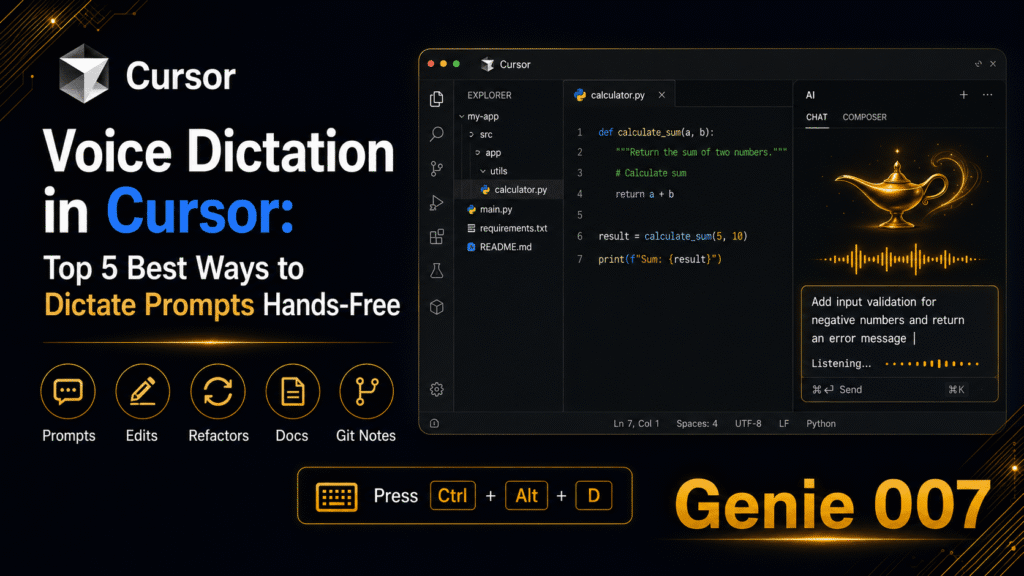
Cursor is the IDE that turned vibe coding from a concept into a daily workflow. Its Composer panel lets you describe features, request refactors, and fix bugs in natural language — the AI generates the code. But here’s the irony: most developers are still typing those natural language prompts on a keyboard. You’re using an AI tool designed for conversational input, yet communicating with it through the slowest possible channel. Cursor voice dictation fixes this mismatch. When you speak your prompts instead of typing them, you deliver more detail in less time, produce better first-pass code from the AI, and maintain the flow state that makes vibe coding productive.
This guide covers how to set up voice dictation for Cursor with Genie 007, specific workflows for Composer prompts, inline edits, code reviews, and terminal commands, why spoken prompts consistently produce better AI output, and how to handle technical vocabulary. If you use Cursor daily, voice input is the fastest upgrade you can make to your development workflow. Cursor Voice Dictation enables hands-free coding and prompt creation in real time.
Cursor Voice Dictation: Why Voice Input Makes Cursor Better
Cursor’s power is in its ability to translate natural language intent into working code. The better your intent description, the better the code. This creates a direct relationship between prompt quality and development speed — and voice input systematically improves prompt quality for three reasons.
Speaking is 3x faster than typing. You speak at 130–150 words per minute. You type at 40–60. A Composer prompt that takes 45 seconds to type takes 15 seconds to speak. Across a full development session with dozens of Composer interactions, voice input saves 30–60 minutes. But the speed advantage is secondary to the quality advantage. Cursor Voice Dictation enables hands-free coding and prompt creation in real time.
Spoken prompts are more detailed. When typing feels slow, developers unconsciously abbreviate their prompts. “Add auth endpoint” becomes the typed prompt instead of “Create an authentication endpoint that accepts POST requests with email and password, validates both fields, hashes the password with bcrypt using 12 salt rounds, stores the user in PostgreSQL, and returns a JWT that expires in 24 hours with the user ID and email in the payload.” The short version produces code that needs three rounds of correction. The detailed version — which takes 15 seconds to speak — produces code that’s correct on the first pass. Voice removes the effort barrier that makes developers write lazy prompts.
Voice maintains flow state. Cursor’s Composer is designed for rapid iteration — describe, generate, review, refine. Typing breaks this rhythm because the physical act of pressing keys is slow and tedious. Voice input keeps the conversation flowing at the speed of thought. You see the generated code, immediately speak your refinement, and the next iteration appears. The feedback loop tightens from minutes to seconds. Cursor Voice Dictation enables hands-free coding and prompt creation in real time.
Setting Up Genie 007 for Cursor
Genie 007’s desktop application provides system-wide voice typing that works in every application on your computer — including Cursor. The setup takes under two minutes.
Step 1: Download Genie 007 Desktop
Visit genie007.co.uk and download the desktop application for your operating system (Windows or Mac). Install it normally — no special configuration required. Cursor Voice Dictation enables hands-free coding and prompt creation in real time.
Step 2: Activate in Cursor
Open Cursor. Click into any text field — the Composer panel, an inline edit prompt, or the chat sidebar. Activate Genie 007 using the keyboard shortcut or system tray icon. Speak your prompt. The text appears in the Cursor input field instantly.
Step 3: Start Coding by Voice
That’s it. No API keys, no configuration files, no extension installation within Cursor. Genie 007 operates at the system level, injecting text into whatever application has focus. Every text input in Cursor becomes voice-enabled — Composer, chat, inline edits, terminal, file search, and commit messages. Cursor Voice Dictation enables hands-free coding and prompt creation in real time.
For browser-based developer tools (GitHub, ChatGPT, Jira, Linear), install the Genie 007 Chrome extension as well. This covers your entire development workflow — IDE and browser — with a single voice typing solution.
Cursor Voice Dictation Workflows
Workflow 1: Composer Prompts
Composer is where most Cursor development happens. You describe what you want, and the AI generates or modifies code across your project. Voice input transforms this from a typing exercise into a conversation. Cursor Voice Dictation enables hands-free coding and prompt creation in real time.
What you say: “Create a new React component called UserDashboard that fetches user data from the API endpoint slash users slash me, displays the user’s name, email, and subscription status, and includes a skeleton loader while the data is fetching. Use the existing useAuth hook for authentication and the Card component from our design system. Handle the error state with a retry button. Add TypeScript interfaces for the user data shape.”
What Cursor generates: A complete component with data fetching, loading states, error handling, proper typing, and integration with existing project patterns — because the spoken prompt included every requirement. Speaking this took 20 seconds. Typing the same prompt would take over a minute, and most developers would trim it to “make a user dashboard component” to save time, producing code that misses half the requirements. Cursor Voice Dictation enables hands-free coding and prompt creation in real time.
Workflow 2: Inline Edits (Cmd+K / Ctrl+K)
Cursor’s inline edit feature lets you select code and describe a modification. Voice input makes these micro-edits nearly instantaneous.
What you do: Select a function. Press Cmd+K. Speak: “Add input validation that checks if the amount is a positive number and the currency is one of USD, EUR, or GBP. Throw a descriptive error for each invalid case.” Cursor Voice Dictation enables hands-free coding and prompt creation in real time.
What Cursor does: Modifies the selected function in place with the exact validation logic you described. The inline edit cycle — select, invoke, describe, accept — takes under 10 seconds with voice input. With typing, the description step alone takes 20–30 seconds.
Workflow 3: Code Review and Explanation
Cursor’s chat panel lets you ask questions about your codebase. Voice input makes these interactions feel like pair programming with a senior developer. Cursor Voice Dictation enables hands-free coding and prompt creation in real time.
What you say: “Explain why this useEffect is causing an infinite re-render loop. I suspect the dependency array is wrong because the fetchData function is being recreated on every render, but I’m not sure if wrapping it in useCallback would fix it or just move the problem. What’s the cleanest solution that doesn’t break the data fetching behaviour?”
What Cursor explains: A detailed analysis of the render loop cause with a specific, context-aware solution. The spoken question included the developer’s hypothesis, the constraints, and the quality criteria — information that a typed question would abbreviate into “why is this useEffect looping?” Cursor Voice Dictation enables hands-free coding and prompt creation in real time.
Workflow 4: Multi-File Refactoring
Cursor’s Composer can modify multiple files simultaneously. Complex refactoring descriptions benefit enormously from voice input because they require extensive context.
What you say: “Refactor the payment processing to use the strategy pattern. Create a PaymentStrategy interface with methods for charge, refund, and getTransactionStatus. Implement three concrete strategies: StripeStrategy, PayPalStrategy, and BankTransferStrategy. Create a PaymentStrategyFactory that selects the correct strategy based on the paymentMethod field in the Order model. Update the existing PaymentService to use the factory instead of the current switch statement. Move each strategy to its own file in a new strategies directory. Keep the existing tests passing and add new tests for the factory.” Cursor Voice Dictation enables hands-free coding and prompt creation in real time.
What Cursor generates: A complete multi-file refactoring across 6+ files — new interfaces, strategy implementations, factory, service updates, and tests. The spoken description provided enough context for Cursor to make correct decisions about file structure, naming conventions, and test coverage. This level of detail in a typed prompt would take 2–3 minutes and most developers would break it into multiple smaller prompts instead, losing the cohesion of a single architectural change.
Workflow 5: Commit Messages and PR Descriptions
Cursor’s integrated terminal and Git features make it natural to dictate commit messages and PR descriptions directly from the IDE. Cursor Voice Dictation enables hands-free coding and prompt creation in real time.
What you say: “Fix race condition in WebSocket reconnection handler. Previous implementation could fire multiple simultaneous reconnection attempts if the connection dropped during an active retry. Added mutex lock around reconnection logic and exponential backoff timer to prevent retry storms. Includes unit tests for concurrent disconnection scenarios and integration test for the backoff timing.”
What appears as your commit message: A detailed, reviewer-friendly description that explains the what, the why, and the testing approach. With typing, this would have been abbreviated to “fix ws reconnect bug” because the detailed version takes a minute to type but only 15 seconds to speak. Cursor Voice Dictation enables hands-free coding and prompt creation in real time.
Workflow 6: Documentation and Comments
Cursor can generate and edit documentation. Voice input makes the most tedious part of development — writing docs — painless enough that you’ll actually do it.
What you say: “Add JSDoc comments to all the public methods in this file. For each method, include a description of what it does, the parameter types and what they represent, the return type and what it contains, and any exceptions that can be thrown. Use the existing documentation style from the AuthService file as a reference.” Cursor Voice Dictation enables hands-free coding and prompt creation in real time.
What Cursor generates: Complete, consistent documentation across every public method in the file, matching the project’s existing documentation patterns. Spoken in 15 seconds. A typed prompt would take 45 seconds and probably skip the “match existing style” instruction.
Handling Technical Vocabulary
Developers worry that voice dictation won’t handle programming terminology. Genie 007’s AI language model eliminates this concern. Cursor Voice Dictation enables hands-free coding and prompt creation in real time.
Framework and library names — React, Vue, Angular, Express, FastAPI, Django, Next.js, Tailwind, PostgreSQL, MongoDB, Redis, Kubernetes, Docker — are all recognised accurately. The language model understands developer context and selects the correct interpretation automatically.
Programming terms — async, await, middleware, webhook, endpoint, polymorphism, dependency injection, singleton, observer pattern — transcribe correctly because the AI model understands technical English at a deep level. Cursor Voice Dictation enables hands-free coding and prompt creation in real time.
Variable and function names — For camelCase or snake_case names, you can spell them naturally: “the function handle user authentication” becomes handleUserAuthentication in context. For unusual names, spell them out: “user underscore auth underscore token” produces user_auth_token. After using a name once, Genie 007 recognises it in subsequent dictation.
Code syntax — While you can dictate syntax (“const result equals await fetch open paren URL close paren”), in Cursor this is rarely necessary. The whole point of speech to text for cursor is describing intent in natural language and letting the AI write the syntax. You say “create a fetch call that gets user data from the API,” not the actual code. Cursor handles the syntax; you handle the intent. Cursor Voice Dictation enables hands-free coding and prompt creation in real time.
Privacy and Security
Development environments handle sensitive code, proprietary algorithms, API keys, and infrastructure details. Cursor AI voice input through Genie 007 keeps all of this secure.
Genie 007 processes all audio locally on your device. The speech recognition model runs on your computer — no audio data is sent to external servers. No recordings are created or stored. The only output is the text that appears in Cursor’s input fields, which stays within your development environment. Cursor Voice Dictation enables hands-free coding and prompt creation in real time.
This matters because Cursor prompts often contain proprietary context: “Refactor the payment processing to handle the new Stripe webhook format for subscription renewals, and ensure the customer portal API key rotation logic still works.” That prompt contains architectural and business logic details. With Genie 007’s local processing, that information never leaves your machine. Read the full technical details in our security and privacy guide.
Frequently Asked Questions
Does voice dictation work with Cursor’s Composer, Chat, and inline edits?
Yes. Genie 007 provides system-wide voice typing that works in every text input field, including Cursor’s Composer panel, Chat sidebar, inline edit prompts (Cmd+K), terminal, file search, and any other input field within the IDE. Cursor Voice Dictation enables hands-free coding and prompt creation in real time.
Will voice dictation slow down my coding workflow?
The opposite. Voice input is 3x faster than typing for prompt composition. A detailed Composer prompt that takes 60 seconds to type takes 20 seconds to speak. Across a full development session, voice input saves 30–60 minutes while producing better prompts that reduce iteration cycles. The net effect is significantly faster development.
Can I switch between voice and keyboard smoothly?
Yes. Genie 007 activates on demand — you use voice for prompt composition and the keyboard for everything else (navigation, selection, editing, shortcuts). Most developers find a natural rhythm within a day: voice for text-heavy inputs (prompts, descriptions, documentation), keyboard for code manipulation. The two modes complement each other rather than competing. Cursor Voice Dictation enables hands-free coding and prompt creation in real time.
Does it work with Cursor on Windows and Mac?
Yes. Genie 007’s desktop application supports both Windows and Mac. It works identically on both platforms, providing system-wide voice typing that integrates smoothly with Cursor regardless of your operating system.
What about pair programming or shared screens?
Voice dictation works normally during screen sharing and pair programming sessions. With a headset microphone, your dictation is clear and doesn’t pick up your pair partner’s voice. Some teams find that voice-driven Cursor sessions are more collaborative because both developers can see the prompts being composed in real time. Cursor Voice Dictation enables hands-free coding and prompt creation in real time.
Start Dictating Cursor Prompts
Cursor changed how developers write code. Voice dictation changes how developers talk to Cursor. The combination — AI-generated code from voice-described intent — is the fastest development workflow available in 2026. You describe what you want at the speed of thought, and Cursor implements it.
Try it on your next coding session: install Genie 007, open Cursor, and speak your next Composer prompt instead of typing it. Compare the detail and clarity of your spoken prompt to what you’d normally type. That difference is the reason voice-powered vibe coding cursor workflows produce better code faster. Cursor Voice Dictation enables hands-free coding and prompt creation in real time.
Explore the full developer toolkit for voice-powered development, including ChatGPT voice integration and voice typing for every application on your computer. For privacy details, read our security and privacy guide.
Try Voice Typing for Cursor — Free, No Credit Card
Stop typing prompts. Start speaking them. Install Genie 007 and voice-enable your entire Cursor workflow — from Composer prompts to commit messages. Cursor Voice Dictation enables hands-free coding and prompt creation in real time.
Get Genie 007 for Chrome — Free, forever. No credit card. Desktop app for system-wide voice typing in Cursor and every other application.
Also read: Voice Typing for ChatGPT: Dictate Prompts — Genie 007 Cursor Voice Dictation enables hands-free coding and prompt creation in real time.
Written by Bill Kiani, founder of Genie 007.
Cursor Voice Dictation enables hands-free coding and prompt creation in real time.