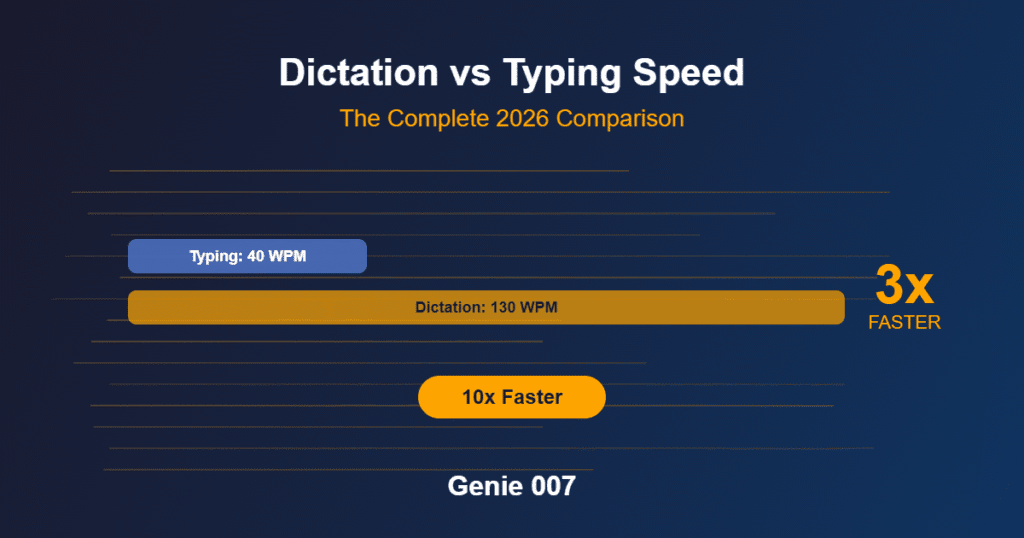
The average person types 40 words per minute. The average person speaks at 150 words per minute. For writers — people whose entire output is measured in words — this isn’t a curiosity, it’s a productivity multiplier sitting untouched on their desk. A novelist writing 2,000 words per day at typing speed spends roughly 50 minutes on the physical act of typing. At speaking speed, that same 2,000 words takes 13 minutes. The remaining 37 minutes can go toward thinking, editing, research, or writing more. Multiply that across a year of daily writing, and dictation software for writers isn’t a convenience — it’s a fundamentally different approach to producing written work.
But writers have specific requirements that generic dictation tools don’t address. You need continuous dictation that doesn’t time out mid-paragraph. You need AI that handles complex sentence structures, dialogue formatting, and creative vocabulary without mangling your prose. You need a tool that works in your writing application — whether that’s Scrivener, Google Docs, Word, Ulysses, or a plain text editor — without requiring you to switch workflows. And you need dictation that produces clean first drafts, not transcription-quality output that requires as much editing as typing from scratch would have taken.
If you want to compare dictation tools beyond writing-specific options, our best dictation software 2026 roundup covers 15 tools across every use case.
This guide covers the best dictation tools for fiction writers, non-fiction authors, bloggers, and content creators in 2026 — tested specifically for writing workflows rather than general productivity.
What Writers Need from Dictation Software for Writers
Writers’ dictation needs differ from business users, developers, or casual users in several important ways.
Continuous dictation without timeouts. Most dictation tools are designed for short bursts — a sentence, a paragraph, a search query. They stop listening after a few seconds of silence. For writers, this is unusable. Creative writing involves pauses to think, silences while you formulate the next sentence, and extended sessions that can run for 30 minutes or more. The dictation tool must stay active through natural pauses without cutting off your session.
Clean prose output. When a business user dictates “schedule a meeting with John next Tuesday at three PM,” accuracy means getting the facts right. When a writer dictates “The cathedral’s shadow stretched across the cobblestones like a dark hand reaching for the river,” accuracy means preserving the rhythm, word choice, and punctuation of creative language. Writers need dictation that handles metaphors, unusual sentence structures, proper nouns (character names, place names), and intentional stylistic choices without “correcting” them into generic phrasing.
Punctuation intelligence. Automatic punctuation is critical for writers because manually saying “comma,” “period,” and “new paragraph” destroys creative flow. The best dictation tools use AI to place punctuation based on your speech patterns — pauses, intonation, and sentence structure — producing properly punctuated prose without verbal commands.
Application compatibility. Writers use diverse tools: Scrivener, Google Docs, Microsoft Word, Ulysses, iA Writer, Bear, Obsidian, Notion, and plain text editors. A dictation tool that only works in one application forces writers to change their workflow. System-wide dictation — one tool that works in every application — is essential.
Distraction-free operation. Writers guard their focus jealously. A dictation tool that pops up floating windows, displays visual indicators, or requires mouse interaction to activate breaks concentration. The best dictation software for writers activates with a keyboard shortcut and operate invisibly — no visual elements to distract from the writing.
1. Genie 007 — Best Dictation Software for Writers Overall
Genie 007 combines every feature writers need: continuous dictation without timeouts, AI-powered punctuation, system-wide compatibility with every writing application, local processing for privacy, and keyboard-shortcut activation that keeps your hands on the keyboard and your mind on the writing.
The AI language model is what separates Genie 007 from basic dictation tools. It understands context at a deep level — not just converting sounds to words, but comprehending meaning, grammar, and sentence structure. When you dictate creative prose, the AI preserves your word choices, handles unusual vocabulary, and places punctuation based on your natural speech patterns. You don’t say “period” or “new paragraph” — you pause naturally, and the AI adds the appropriate punctuation.
For fiction writers, this means you can dictate dialogue, description, and narrative in a natural speaking voice without thinking about formatting. The AI handles the mechanical aspects of writing while you focus on the creative aspects. For non-fiction writers and bloggers, the AI’s handling of technical vocabulary, proper nouns, and complex sentence structures means your dictated drafts are cleaner and require less editing.
The system-wide compatibility is crucial for writers who use Scrivener, Ulysses, or other dedicated writing software. Genie 007’s desktop application works in every application on your computer — you don’t need to dictate into a separate window and paste the text over. You click into your Scrivener chapter, activate dictation with your keyboard shortcut, and speak. The text appears directly in your manuscript, exactly where you want it.
Local processing means your manuscripts, story ideas, and drafts never leave your device. For writers working on unpublished novels, sensitive non-fiction projects, or client work, this privacy is non-negotiable. Cloud-based dictation tools send your spoken words to external servers — which means your unpublished manuscript is being processed on infrastructure you don’t control.
The 140+ language support is relevant for writers working in multiple languages, writing bilingual content, or including foreign-language dialogue in fiction. Genie 007 detects language automatically, so you can switch between English and another language mid-paragraph without changing settings.
Price: Free. Best for: All writers — fiction, non-fiction, bloggers, content creators. The combination of AI accuracy, system-wide compatibility, continuous dictation, and local processing makes it the default choice.
2. Dragon Professional — Dictation Software for Writers Who Need Voice Control
Dragon NaturallySpeaking Professional has been the go-to dictation software for writers for over two decades. Its accuracy, especially after voice training, is excellent — consistently hitting 99% for users who’ve invested time in building their Dragon profile. Dragon learns your vocabulary over time, which is particularly valuable for fiction writers with character names, place names, and invented words that appear repeatedly throughout a manuscript.
Dragon’s unique advantage for writers is its voice command system. Beyond dictation, you can use voice commands to navigate your document — “go to end of paragraph,” “select previous sentence,” “bold that” — without touching the keyboard. For writers who want to keep their hands completely free (or who have RSI or other conditions that make keyboard use painful), Dragon’s full voice control is unmatched.
The downsides are significant in 2026. Dragon costs $500–$700, hasn’t received a major update in years, and its future is uncertain. The interface feels dated, the initial setup requires 20–30 minutes of voice training, and it only supports 6 languages. For writers who already own Dragon and have trained profiles, it remains excellent. For new users, the price and aging technology are hard to justify when free alternatives like Genie 007 match or exceed its dictation accuracy.
Price: $500–$700. Best for: Writers who need full voice control of their computer. Writers with existing Dragon profiles. Writers with RSI who want to minimise all keyboard use.
3. Google Docs Voice Typing — Free Dictation Software for Writers
Google Docs Voice Typing is free, requires no installation, and works immediately in Google Docs. For writers who work exclusively in Google Docs, it’s a viable option that produces reasonable accuracy for conversational prose.
The limitations for writers are significant. It only works in Google Docs in Chrome — not in Scrivener, Word, Ulysses, or any other writing application. It requires an internet connection because audio is processed on Google’s servers. It doesn’t handle extended silence well, often stopping after a few seconds of pause — which is exactly when writers need it most. And the accuracy, while acceptable for standard English, drops noticeably with creative vocabulary, unusual names, and complex sentence structures.
It also breaks frequently. Chrome updates, extension conflicts, and Google’s own service changes can cause Voice Typing to stop working without warning. For a writer in the middle of a productive dictation session, having the tool suddenly fail is disruptive and frustrating.
Price: Free. Best for: Writers who work exclusively in Google Docs and want basic dictation without installing software. Not recommended for serious daily use.
4. Wispr Flow — Dictation Software for Writers Who Want AI Editing
Wispr Flow goes beyond basic dictation by offering AI-powered text transformation. After dictating, you can tell Wispr to rewrite a paragraph in a different tone, expand a sentence, condense a section, or restructure your prose — all by voice. For writers who use dictation for rough first drafts and then want to refine the output quickly, this workflow can be efficient.
The contextual awareness is useful — Wispr adapts its output based on where you’re writing, producing more formal prose in a document editor and more conversational text in a messaging app. For bloggers and content creators — a key audience for dictation software for writers — this adaptation saves editing time.
The trade-offs are cloud dependency (all audio goes to Wispr’s servers), subscription pricing ($8–$10/month), and the fact that the AI “enhancement” can sometimes alter your intended voice. Writers who have a strong personal style may find the AI’s suggestions unwelcome — it can smooth out the rough edges that make prose distinctive.
Price: $8–$10/month. Best for: Bloggers and content creators who want AI editing assistance built into dictation. Not ideal for fiction writers who want their exact words preserved.
5. Windows/Mac Built-In — Entry-Level Dictation Software for Writers
Both Windows (Win+H) and macOS (double-press Fn) include built-in dictation. These are the simplest way to try voice typing with zero setup — press the shortcut, speak, and text appears. For writers who’ve never used dictation and want to experiment before committing to a dedicated tool, the built-in options are a risk-free starting point.
The limitations become apparent quickly for serious writing use. Both require internet connections (audio is processed in the cloud). Both struggle with extended dictation sessions. Punctuation handling is basic. Vocabulary recognition is limited. And neither offers the AI-powered accuracy that makes modern dictation tools genuinely useful for producing clean prose.
Price: Free. Best for: Writers who want to try dictation for the first time before investing in a dedicated tool.
How to Use Dictation Software for Writers Effectively
Dictation is a skill. The first time you try it, you’ll probably speak haltingly, lose your train of thought, and produce awkward prose. This is normal — you’ve spent years training yourself to compose at typing speed. Dictation requires retraining your composition process to work at speaking speed, and this adaptation takes a week or two of daily practice.
Start with non-precious writing. Don’t dictate your novel’s climactic scene on day one. Start with emails, journal entries, blog post drafts, or freewriting exercises. This lets you develop your dictation rhythm without the pressure of producing your best work.
Speak in complete thoughts. The most common dictation mistake is trying to compose word-by-word, the way you type. Instead, formulate a complete sentence or thought in your head, then speak the entire thing. This produces more natural prose and gives the AI better context for punctuation and word choice.
Don’t edit while dictating. When you hear an error, the temptation is to stop and correct it immediately. Resist this. Dictation is for generating text; editing is a separate phase. Stopping to fix errors breaks your creative flow and slows you down to typing speed. Dictate your full session, then switch to editing mode and clean up errors with the keyboard.
Walk while dictating. Many writers find that gentle movement — walking around a room, pacing in a garden — dramatically improves their dictation output. The physical movement engages a different part of the brain than sitting at a desk, and the combination of walking and speaking produces more fluid, natural prose than sitting and speaking. If your dictation tool runs on your phone or laptop, take it with you.
Use dictation for different writing phases. Dictation excels at first drafts, brainstorming, and freewriting — the generative phases where speed and flow matter more than precision. Use your keyboard for editing, revision, and careful prose polishing — the analytical phases where precision matters more than speed. This hybrid approach gives you the best of both methods.
Word Count Goals: How Dictation Software for Writers Changes Output
Here’s how dictation speed translates to real writing output, assuming 150 words per minute speaking speed with pauses for thinking:
A 15-minute dictation session produces approximately 1,000–1,500 words of raw first draft. A 30-minute session produces 2,000–3,000 words. A one-hour session produces 4,000–6,000 words. These numbers include natural thinking pauses — actual sustained dictation is faster, but no one speaks continuously for an hour without pausing to think.
For context, most professional novelists aim for 1,000–2,000 words per day. With dictation software for writers, that daily goal can be achieved in 15–30 minutes of actual dictation time — leaving the rest of your writing session for editing, research, and planning. Some dictation-focused authors report writing 5,000–10,000 words per day by combining multiple dictation sessions with editing breaks.
Privacy Considerations When Using Dictation Software for Writers
Writers should pay particular attention to how their dictation tool handles audio data. If you’re dictating unpublished fiction, the content of your dictation is essentially your unpublished manuscript — plot details, character developments, twists, and creative ideas that you haven’t shared publicly.
Cloud-based dictation tools (Google Voice Typing, Wispr Flow, Windows/Mac built-in dictation) send your audio to remote servers for processing. While these companies generally don’t claim ownership of your content, your spoken words do travel across the internet and are processed on third-party infrastructure. For published authors working on upcoming books, ghostwriters handling client manuscripts, or journalists working on sensitive stories, this is a meaningful risk.
Local-processing tools (Genie 007, Dragon) handle all audio on your device. Nothing is transmitted, recorded, or stored externally. Your spoken manuscript stays on your computer — period. For writers who take their intellectual property seriously, local processing is the only architecture that provides genuine privacy.
Frequently Asked Questions About Dictation Software for Writers
Can I dictate dialogue effectively?
Yes. Modern AI dictation handles dialogue well, including proper quotation mark placement around spoken dialogue. You may need to develop a verbal cue system for dialogue tags — some writers say the character’s name before their line to help during editing. With practice, dictating dialogue becomes as natural as dictating narrative prose.
Does dictation work for poetry?
Dictation is less ideal for poetry because line breaks, spacing, and visual formatting are integral to the form. You can dictate the words, but you’ll likely need to format line breaks and stanza structure manually during editing. For prose poetry or free verse with natural sentence structures, dictation works well.
How do I handle character names and made-up words?
AI dictation tools learn from context. After dictating a character name several times, the AI recognises it as an intentional word and reproduces it consistently. For the first few uses of an unusual name, you may need to spell-correct it during editing. Tools with local AI models (like Genie 007) tend to handle creative vocabulary better than cloud-based tools because the language model processes context more deeply.
Will dictation change my writing style?
Yes — and many writers consider this a benefit. Dictated prose tends to be more conversational, more rhythmic, and more natural-sounding than typed prose. Typed writing often becomes stilted because the slow speed of typing encourages over-thinking each word. Dictated writing flows more like natural speech, which produces prose that’s easier and more engaging to read. Many bestselling authors — including Kevin J. Anderson and Terry Goodkind — have used dictation extensively.
Start Writing Faster
Dictation is the single biggest productivity multiplier available to writers. It’s not about replacing your keyboard — it’s about adding a faster input method for the phases of writing where speed and flow matter most. Generate first drafts by voice, edit and polish by keyboard, and watch your daily word count climb.
Start with Genie 007 — it’s free, works in every writing application, produces clean AI-powered output, and processes everything locally for manuscript privacy. Install the Chrome extension for browser-based writing or download the desktop application for system-wide dictation in Scrivener, Word, Ulysses, and every other tool. For more on how the AI works, read the technology overview and privacy guide.
Try Genie 007 — Dictation for Writers
Continuous dictation. AI punctuation. Works in Scrivener, Word, Google Docs, and everything else. Install Genie 007 from the Chrome Web Store.
Get Genie 007 for Chrome — Free, forever. No credit card. Desktop app for system-wide voice typing in every writing app.
Written by Bill Kiani, founder of Genie 007.
Related: Voice Typing with Screen Readers: Accessibility Guide