People use “dictation” and “transcription” interchangeably — and then wonder why the tool they downloaded doesn’t do what they expected. A journalist buys a dictation app hoping it will transcribe recorded interviews, and discovers it only works with live speech. A developer installs a transcription service to dictate code comments in real time, and finds it’s designed for processing audio files after the fact. Understanding AI dictation vs transcription properly avoids costly mistakes. These aren’t the same technology. They solve different problems, work in different ways, and serve different workflows. Understanding the difference between AI dictation vs transcription saves you from choosing the wrong tool, wasting money on features you don’t need, and missing the capabilities that would actually speed up your work.
This guide explains the fundamental difference between dictation and transcription, how AI has transformed both technologies, which one you actually need based on your workflow, and where the line between them is blurring. If you’ve been confused by overlapping marketing claims from voice technology companies, this will clarify exactly what each tool does and doesn’t do.
What Is Dictation?
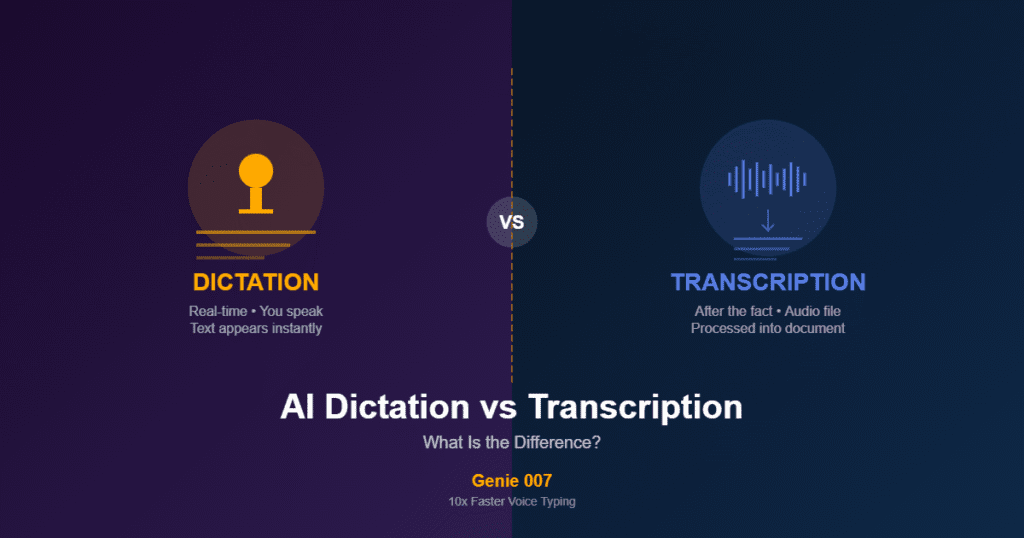
When comparing AI dictation vs transcription, dictation is the real-time side of the equation. AI dictation vs transcription is not interchangeable terminology. of the equation. Dictation is real-time voice-to-text input. You speak, and your words appear as text immediately — in the document, email, chat message, or code editor you’re working in. The defining characteristic of dictation is that it replaces your keyboard. Instead of typing a sentence, you say it. Instead of pressing keys to compose an email, you speak the email and it appears in the compose window. Dictation is an input method, just like a keyboard or a touchscreen.
The key attributes of dictation are immediacy, intentionality, and integration. It’s immediate because the text appears as you speak — there’s no delay between speaking and seeing your words on screen. It’s intentional because you’re consciously composing text, choosing your words as you go, just as you would when typing. And it’s integrated because the text goes directly into whatever application you’re using — your email client, your word processor, your IDE, your browser.
Traditional dictation tools used basic speech recognition that converted individual words to text phonetically. Modern AI dictation — like Genie 007 — uses language models that understand context, grammar, and meaning. This means the AI doesn’t just hear sounds and guess words; it understands what you’re saying and produces properly punctuated, grammatically correct text. When you say “their going to the store,” an AI dictation tool knows from context whether you mean “their,” “there,” or “they’re.” When you pause mid-sentence, it adds a comma rather than ending the sentence. When you speak technical terminology, it recognises the domain and selects the correct spelling.
Dictation is the right tool when you’re creating content in real time — writing emails, composing documents, entering data into forms, coding, chatting, or any task where you’d normally use a keyboard to input text.
What Is Transcription?
On the other side of AI dictation vs transcription, transcription works on pre-recorded audio. This is the defining boundary in AI dictation vs transcription. Transcription converts existing audio into text. The audio might be a recorded meeting, a podcast episode, a court proceeding, a medical consultation, a video interview, or any other audio source. The defining characteristic of transcription is that it processes audio that already exists — either from a recording or from a live stream of audio that the user isn’t composing (like a meeting with multiple speakers).
The key attributes of transcription are retrospective processing, multi-speaker handling, and post-production editing. It’s retrospective because the audio was created independently of the transcription process — someone had a conversation, gave a lecture, or conducted an interview, and now that audio needs to be converted to text. It handles multiple speakers because most transcription scenarios involve more than one person talking. And it typically includes a post-production phase where the raw transcript is cleaned up, speaker labels are assigned, timestamps are added, and errors are corrected.
Traditional transcription was a manual process — a human typist listened to audio and typed what they heard, often at 4x real-time (a one-hour recording took four hours to transcribe). AI transcription tools like Otter.ai, Rev, and Tactiq have automated much of this process, producing machine-generated transcripts that are then reviewed and corrected. The best AI transcription services achieve 95–98% accuracy on clear audio with single speakers, though accuracy drops with background noise, heavy accents, overlapping speech, and poor recording quality.
Transcription is the right tool when you need a text record of audio that already happened — meeting minutes, interview transcripts, podcast show notes, legal depositions, medical records, or video subtitles.
The Core Difference: AI Dictation vs Transcription
The core of AI dictation vs transcription comes down to when processing happens. The simplest way to understand the difference: dictation is you speaking to create text. Transcription is converting someone else’s speech (or your past speech) into text.
With dictation, you are the author. You’re composing text in real time, choosing your words deliberately, and the voice input tool is replacing your keyboard. The output goes directly into your active application — your document, your email, your code editor.
With transcription, you (or someone else) already spoke, and now you need a written record of what was said. The audio exists independently, and the transcription tool processes it into text. The output is typically a standalone document — a transcript file, a set of meeting notes, a caption track.
This distinction matters because the technology behind each is optimised differently. Dictation tools prioritise low latency (text must appear instantly as you speak), direct integration with applications (text goes into your active text field), and single-speaker accuracy (only one person is dictating). Transcription tools prioritise processing accuracy over speed (it’s fine if transcription takes time), speaker identification (labelling who said what), and handling of imperfect audio (recordings with noise, crosstalk, and varying quality).
How AI Has Changed Both
AI has transformed AI dictation vs transcription in fundamentally different ways. AI dictation vs transcription both benefit from neural network advances. Before AI, dictation and transcription were clearly separate technologies with obvious limitations. Dictation tools like Dragon NaturallySpeaking required voice training, produced frequent errors, and couldn’t handle punctuation automatically. Transcription was either manual (expensive and slow) or machine-generated (cheap but inaccurate). AI has dramatically improved both — and started blurring the line between them.
AI dictation improvements. Modern AI dictation tools like Genie 007 use language models that understand context at a deep level. This produces several capabilities that were impossible with traditional speech recognition. Automatic punctuation — the AI adds commas, periods, question marks, and paragraph breaks based on your speech patterns, so you never need to say “period” or “new paragraph.” Technical vocabulary recognition — the AI understands programming terms, medical terminology, legal language, and business jargon because it comprehends meaning, not just sounds. Accent and dialect handling — the AI recognises diverse accents because it uses contextual understanding to disambiguate words that might sound different across dialects. Multilingual support — advanced AI models can handle 140+ languages and even switch between languages mid-sentence.
AI transcription improvements. AI transcription services now produce near-human-level accuracy on clear audio. Speaker diarisation automatically identifies and labels different speakers. AI-generated summaries extract key points, action items, and decisions from transcribed meetings. Real-time transcription can process live audio streams (like video calls) with minimal delay. And translation can convert transcripts from one language to another automatically.
Where the line blurs. Some tools now offer both capabilities. A meeting transcription tool might also let you dictate notes during the meeting. A dictation tool might offer to transcribe audio files you upload. However, most tools are still optimised for one or the other — and using a transcription tool for dictation (or vice versa) usually produces a suboptimal experience. A transcription tool used for dictation will have noticeable latency and won’t integrate directly into your active text fields. A dictation tool used for transcription won’t handle multiple speakers or process pre-recorded audio files.
Which One Do You Need? AI Dictation vs Transcription Guide
Choosing between AI dictation vs transcription starts with one question: are you creating text live or converting recorded audio? Your choice depends on what you’re trying to accomplish.
You need dictation if: You want to compose text by speaking instead of typing. You’re writing emails, documents, code comments, chat messages, or any other text in real time. You want your spoken words to appear directly in whatever application you’re using — not in a separate transcript document. You’re the only speaker, and you’re deliberately creating content. You want zero latency between speaking and seeing text. You want to replace or supplement your keyboard for text input.
You need transcription if: You have a recording (or live audio stream) that needs to be converted to text. The audio involves multiple speakers and you need to identify who said what. You need a written record of a conversation, meeting, interview, or event that already happened. Accuracy of the final document matters more than speed of initial processing. You need timestamps, speaker labels, or structured meeting minutes.
You need both if: You attend meetings where you want live transcription of the discussion AND the ability to dictate your own notes and action items into a document. You create content from interviews — transcribing the interview first, then dictating your article based on the transcript. You work in a medical, legal, or business context where you need transcripts of consultations AND the ability to dictate reports and correspondence.
Common Mistakes When Choosing
Confusing AI dictation vs transcription leads to wasted money and frustration. The AI dictation vs transcription mix-up is extremely common. Buying a transcription tool for dictation. This happens when someone searches for “speech to text” and installs the first tool they find — often a meeting transcription tool like Otter.ai or Tactiq. These tools are excellent at transcribing meetings and recorded audio, but they don’t provide the direct text-input functionality of a dictation tool. You can’t use Otter to dictate an email in Gmail or type code comments in VS Code. If your goal is to replace keyboard typing with voice input, you need a dictation tool like Genie 007.
Using basic dictation for meeting transcription. Conversely, someone might try to use their phone’s built-in dictation or a Chrome dictation extension to create meeting transcripts. Basic dictation tools aren’t designed for this — they can’t handle multiple speakers, they don’t label who said what, and they struggle with the overlapping speech and varying audio quality typical of meetings.
Confusing accuracy claims. Transcription services and dictation tools both claim high accuracy percentages, but they’re measuring different things. A transcription service claiming 98% accuracy means that 98% of words in a processed audio file are correctly identified. A dictation tool claiming high accuracy means that what you deliberately speak is correctly converted to text. These are different challenges — dictation has the advantage of a single, intentional speaker with a clear microphone signal, while transcription deals with multiple speakers, varying audio quality, and natural conversation patterns.
Overlooking privacy differences. Transcription tools often send audio to cloud servers because processing pre-recorded audio files requires significant computational resources. Dictation tools vary widely — some send audio to the cloud (Google’s Web Speech API, many Chrome extensions), while others process speech entirely on your device (Genie 007). If you’re dictating sensitive business content — client details, financial information, legal documents — a dictation tool that processes audio locally is significantly more private than one that sends your speech to external servers.
The Technology Stack Explained
AI dictation vs transcription each rely on different underlying models. Understanding the technology helps you evaluate tools more critically.
Automatic Speech Recognition (ASR) is the foundational technology that both dictation and transcription rely on. ASR converts audio signals into text. It’s the engine inside every voice technology tool. The quality of the ASR engine determines the base accuracy of any speech-to-text product.
Natural Language Processing (NLP) sits on top of ASR and adds contextual understanding. NLP is what enables automatic punctuation, grammar correction, and technical vocabulary recognition. A dictation tool with strong NLP produces clean, readable text from natural speech. A transcription tool with strong NLP produces well-formatted transcripts with proper sentence structure.
Speaker diarisation is the technology that identifies and labels different speakers in an audio stream. This is critical for transcription (labelling “Speaker 1” and “Speaker 2” in meeting transcripts) but irrelevant for dictation (there’s only one speaker — you).
Language models are the AI component that understands meaning and context. Modern dictation tools like Genie 007 use advanced language models that process your speech semantically — understanding what you mean, not just what you said. This is why AI dictation handles homophones, technical terms, and natural speech patterns so much better than traditional speech recognition.
Genie 007: AI Dictation That Replaces Your Keyboard
For anyone navigating AI dictation vs transcription, Genie 007 sits firmly in the dictation camp. Genie 007 is a dictation tool — not a transcription service. It replaces your keyboard for text input across every application on your computer and every website in your browser. When you speak, text appears instantly in whatever field has focus — email, documents, code editors, chat, forms, and everything else.
What makes Genie 007’s dictation different from basic voice typing is its AI language model. It processes speech locally on your device (no audio sent to servers), handles 140+ languages with automatic detection, adds punctuation automatically, and understands technical vocabulary across domains. The result is dictation that produces clean, accurate text from natural speech — no training period, no voice commands for punctuation, no cloud processing.
If you need transcription — converting recorded meetings, interviews, or audio files into text — Genie 007 isn’t the right tool. Use a dedicated transcription service. But if you need to type faster, dictate emails, write documents, compose code comments, or enter text into any application by voice, Genie 007 is the dictation tool designed for exactly that workflow.
For full details on how Genie 007’s AI dictation works, explore how it works, browse the integration ecosystem, and read our security and privacy guide.
Frequently Asked Questions About AI Dictation vs Transcription
Can one tool do both dictation and transcription?
This is the most searched AI dictation vs transcription question. Some tools offer both capabilities, but most are optimised for one or the other. A tool that excels at real-time dictation (low latency, direct app integration, single-speaker accuracy) uses different optimisations than one that excels at transcription (multi-speaker handling, audio file processing, post-production editing). Using a tool for its secondary purpose usually means a worse experience than using a dedicated tool.
Is dictation more accurate than transcription?
In the AI dictation vs transcription accuracy debate, the answer depends on context. Dictation typically achieves higher accuracy because the conditions are more controlled: a single intentional speaker, a clear microphone signal, and deliberate speech. Transcription deals with harder conditions: multiple speakers, varying audio quality, overlapping speech, and natural conversation patterns that include filler words, false starts, and incomplete sentences.
Does Genie 007 transcribe audio files?
This is a common AI dictation vs transcription confusion point. No. Genie 007 is a dictation tool that provides real-time voice-to-text input. It’s designed to replace your keyboard — you speak, and text appears in your active application instantly. For transcribing recorded audio files or meetings, use a dedicated transcription service.
Why does dictation need to be faster than transcription?
Speed is one of the sharpest contrasts in AI dictation vs transcription. Dictation replaces typing, so it needs to feel as responsive as a keyboard — text must appear as you speak, with no perceptible delay. If dictation had a 2-second lag, it would be unusable for composing text because you’d constantly be waiting for your words to appear. Transcription can take time because you’re processing audio after the fact — whether the transcript takes 30 seconds or 5 minutes to generate doesn’t affect your immediate workflow.
Is cloud-based dictation less private than local dictation?
Privacy is an underrated factor in AI dictation vs transcription selection. Yes. Cloud-based dictation sends your audio to remote servers for processing, which means your spoken words travel over the internet and are processed on infrastructure you don’t control. Local dictation (like Genie 007) processes all audio on your device — nothing is transmitted, recorded, or stored externally. For sensitive business content, local processing is the only option that guarantees your spoken words remain private.
The Bottom Line on AI Dictation vs Transcription
After reviewing AI dictation vs transcription from every angle, the conclusion is clear. Dictation and transcription solve different problems. Dictation replaces your keyboard — you speak text into your active application in real time. Transcription converts existing audio into a written document. Most people who search for “speech to text” actually need dictation — they want to type faster by speaking instead of pressing keys. If that describes you, a dedicated dictation tool like Genie 007 will serve you far better than a transcription service that wasn’t designed for real-time text input.
Try Genie 007 for yourself: install the Chrome extension and speak your next email instead of typing it. The difference between dictation and transcription becomes obvious the moment you experience real-time voice typing that puts text directly into your active application.
Try AI Dictation — Free, No Credit Card
Still unsure about AI dictation vs transcription? Try Genie 007 free and see the difference yourself. Real-time voice typing in every app. 140+ languages. Local processing for privacy. Install Genie 007 from the Chrome Web Store.
Get Genie 007 for Chrome — Free, forever. No credit card. Desktop app for system-wide AI dictation.
Written by Bill Kiani, founder of Genie 007.
Compare more alternatives on our alternatives hub.