Enterprise voice typing has shifted from a convenience feature to a core productivity tool. In 2026, 67% of enterprises now consider voice AI technology foundational to their operations, and teams are moving beyond simple transcription to intelligent voice interfaces that understand context and execute complex actions. This guide covers everything you need to know about implementing enterprise voice typing—from setup to privacy compliance to the specific apps where voice dictation delivers the most impact.
Why Enterprise Teams Need Voice Dictation for Business in 2026
The business case for enterprise voice typing is quantifiable. Research from Stanford shows that speech is 3 times faster than typing, which compounds into significant time savings across a team. A sales representative who dictates email responses instead of typing saves roughly 20–30 minutes per day. Multiply that by an entire team, and you’re looking at dozens of billable hours recovered weekly.
Beyond speed, voice dictation addresses ergonomic strain. Teams working hybrid schedules often spend 8+ hours daily at keyboards, leading to carpal tunnel syndrome, eye strain, and fatigue. Voice typing redistributes cognitive load—your brain focuses on what to say, not how to type it. This reduces mental friction and, counterintuitively, improves output quality because you’re not pausing to correct typos mid-thought.
The adoption curve confirms this: venture capital investment in voice AI jumped from $315 million in 2022 to $2.1 billion in 2024, nearly 7x in two years. Enterprise customers are not experimenting anymore—they’re deploying at scale. The wave moved from “nice to have” to “must have” technology.
However, not all voice typing solutions are built for enterprise. Basic voice-to-text converts speech to words. Enterprise voice dictation does something different—it understands context, applies domain-specific punctuation, handles technical terminology, and in the most advanced systems, executes actions directly from voice commands. This distinction matters enormously for return on investment.
How Enterprise Voice Typing Works: From Dictation to Action
Traditional voice typing transcribes what you say into text. You speak “meeting scheduled for thursday at two pm in conference room b” and it types those exact words. You then manually format it, create the calendar event, and send the notification. This is better than typing from scratch, but still requires post-processing.
Next-generation enterprise voice typing works differently. Genie Mode, for example, transforms voice input into structured output and actions. Say “create a slack message to the engineering team saying we shipped the api update” and the system creates the message, populates it with the right emoji and formatting, and delivers it to the channel. One voice command produces a complete, ready-to-send output.
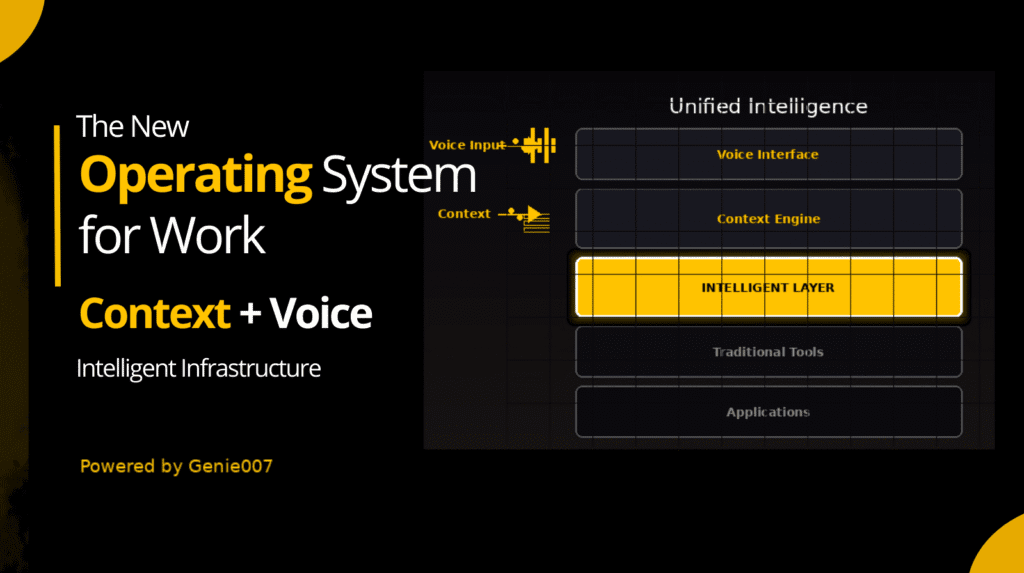
This requires several technical layers working together. First is speech recognition—converting audio into text with 99%+ accuracy. Second is natural language understanding—determining intent, identifying entities, and extracting parameters from conversational input. Third is contextual awareness—knowing what app you’re in, what information is relevant, and what action to execute. Fourth is action execution—actually performing the task across APIs and web interfaces.
For enterprise deployments, this processing happens locally. Audio never leaves your device; no recordings are stored. This satisfies HIPAA, GDPR, and data residency requirements simultaneously. The AI assistant runs on your Chrome extension or Windows/Mac app, processes your voice, and takes action—all without sending audio to external servers.
Speed is the tangible output. A task that requires 10 clicks and 40 seconds of typing (composing an email, creating a Jira ticket, updating a spreadsheet) takes 10 seconds with voice. That multiplies quickly across an organization.
Voice Typing Across 20+ Business Apps: Real Workflows
Enterprise teams work in dozens of applications daily. The real value of voice dictation emerges when it works in all of them. Here’s how voice typing transforms common workflows:
Email (Gmail)
Scenario: You’re in back-to-back meetings and return to 47 unread emails. Using voice typing in Gmail, you open a message and dictate your response while reviewing the next email. The system auto-punctuates, handles multi-sentence paragraphs, and leaves the draft in compose ready to send. Result: clear inboxes in half the time.
Team Chat (Slack)
Your team uses Slack for day-to-day coordination. With voice typing, you can respond to messages without breaking focus—say your reply while reading the conversation. The system respects Slack’s formatting conventions, adds emoji tags if you mention them verbally, and posts to the right channel thread. No context switching.
Project Management (Jira)
Creating a Jira ticket traditionally requires filling multiple fields: title, description, assignee, story points, labels. With voice dictation, you say “create a jira ticket title authentication flow broken in staging environment, assign to alice, 5 points, label critical” and the ticket appears in your backlog. Genie Mode understands the structure of this task and populates each field.
Documentation (Notion)
Technical writers and product managers spend hours in Notion creating documentation. Voice typing lets you dictate paragraphs, structure, and even inline formatting. Dictate “create a header called api rate limits” and the system creates the heading. Dictate “add a code block for curl request to slash api slash users” and it formats the block. Documentation flows faster from thought to page.
Sales and CRM (Salesforce, HubSpot)
Sales teams live in CRM platforms, updating deal stages, logging calls, and updating contact notes. Voice typing in Salesforce lets a rep say “log call with acme corp, 30 minutes, discussed pricing and deployment timeline, next step send contract” and all fields populate. This happens between calls, not after work.
Engineering (GitHub, VS Code)
Developers can voice-dictate commit messages, pull request descriptions, and inline code comments. “Create commit message improve database query performance in user service” generates a well-formatted commit message. “Add comment explaining why we catch the null pointer exception here” documents code intent via voice. Particularly valuable for pair programming, where one developer can voice-dictate while the other drives the keyboard.
Design (Figma)
Design teams use voice typing to add comments on frames, update component descriptions, and log design decisions. Rather than context-switching to a notes app, a designer can say “add comment on this frame discussing color palette rationale” and the system posts it to Figma. For teams collaborating on design systems, this maintains context within the tool.
Social Media and Content (LinkedIn, Discord)
Content creators and community managers work in multiple platforms. Voice typing makes crafting professional posts easier. On LinkedIn, dictate a thought leadership post while you’re thinking it, and the system formats it with proper breaks and spacing. In Discord, community managers can respond to conversations without the friction of typing on a keyboard.
Each of these workflows saves 5–15 minutes per instance. A sales rep doing 8 CRM updates per day saves 40–120 minutes. An engineer writing 20 commit messages and code comments per day saves 20–60 minutes. These are not marginal improvements—they’re meaningful time recovery.
Privacy and Security for Enterprise Voice Dictation
Enterprise teams hesitate on voice AI for one reason: privacy. The assumption is that voice data gets sent to a cloud service, logged, and potentially used to train other systems. This assumption was accurate for consumer voice assistants. It’s not accurate for modern enterprise solutions.
Local processing is now the standard for security-conscious deployments. With Genie 007, audio never leaves your device. The Chrome extension runs the speech-to-text model locally, processes your commands locally, and executes actions locally. No audio files are recorded or stored. This satisfies HIPAA requirements for healthcare organizations, GDPR requirements for European teams, and data residency requirements for finance and government.
The advantage is two-fold. First, security: your voice data doesn’t transit the internet. Second, speed: there’s no network latency. Your voice is processed and acted on instantly.
For teams handling sensitive information—financial services, healthcare, legal, government—this local-first approach is non-negotiable. A healthcare company using voice dictation to document patient interactions must ensure no recordings leave the provider’s network. A law firm using voice to draft client communications must ensure attorney-client privilege is maintained. Local processing solves both.
For compliance specifically, see our detailed guide on privacy and security compliance which covers HIPAA certification, GDPR data handling, SOC 2 compliance, and data residency options for regulated industries.
Setting Up Enterprise Voice Typing for Your Team
Implementation is straightforward. Unlike traditional enterprise software that requires IT infrastructure, complex procurement, and weeks of deployment, modern voice typing works immediately.
Step 1: Install the Extension or App
Download Genie 007 from the Chrome Web Store for browser-based work, or the Windows/Mac desktop app for system-wide voice access. Installation takes 60 seconds. No credit card required for the free tier. Users can toggle between free and premium based on individual needs.
Step 2: Configure Language and Privacy Settings
Genie 007 supports 140+ languages out of the box. If your team is multilingual, you can set your default language and easily switch. Privacy settings are configurable per user—teams can require local processing only, disable certain app integrations, or apply data retention policies. Visit our how-it-works guide for step-by-step configuration.
Step 3: Test in Your Most-Used Apps
Start with the 2–3 apps where you spend the most time. If you’re sales-focused, test in Salesforce first. If you’re engineering-focused, test in GitHub and VS Code. If you’re marketing-focused, test in Slack and email. Once you see the time savings in these high-impact areas, adoption accelerates naturally. Teams don’t need top-down mandates—the time savings are obvious.
For larger rollouts, IT teams can pre-configure enterprise settings, manage user access, and set audit logging. This scales from small teams to organizations with thousands of users.
Return on Investment: Enterprise Voice Dictation Data
The math on enterprise voice typing ROI is straightforward because the time savings are measurable and immediate.
Consider a team of 50 knowledge workers, each spending 5 hours per week on typing-heavy tasks: composing emails, updating documents, creating tickets, logging activities in CRMs. Voice typing at 3x speed reduces this to roughly 1.7 hours per week. That’s 3.3 hours recovered per person weekly, or 165 hours per person annually.
At an average loaded cost of $150/hour (including salary, benefits, and overhead), that’s $24,750 recovered per person annually. For a 50-person team, that’s $1,237,500 in productivity gains per year. Free tier adoption costs nothing. Premium tier (roughly $10/person/month) costs $6,000 annually. ROI is 206x in year one.
These are conservative estimates. Sales teams often see 2–3x ROI improvement because deal velocity increases (faster CRM updates, faster responses to prospects). Engineering teams see improvements in code review velocity and documentation quality. Customer support teams see faster response times and higher customer satisfaction.
Secondary benefits include reduced ergonomic strain (fewer RSI claims), improved employee satisfaction (less time on routine data entry), and better documentation (voice-captured reasoning is more complete than silent note-taking).
Enterprise Voice Typing vs. Traditional Dictation Software: A Comparison
Traditional dictation software like Dragon NaturallySpeaking and older Otter implementations handled transcription: speech-to-text conversion. They were accurate but required post-processing. You dictated a memo, it transcribed it, and you edited it. Useful, but not significant.
Modern enterprise voice typing systems differ in three ways:
Intelligence: Traditional systems transcribe what you say. Modern systems understand what you mean. When you say “send an email to alice about the budget review,” a traditional system types those words. A modern system recognizes intent (send email), identifies the recipient (alice), infers the subject (budget review), and creates the action. This context-awareness is the key difference.
Integration: Traditional systems worked in word processors and dedicated dictation apps. Modern enterprise voice typing works in every app you actually use—Gmail, Slack, Salesforce, Jira, GitHub, Figma, HubSpot, and dozens more. Integration matters more than transcription accuracy because your team lives in these applications.
Speed: Traditional systems operated at speech speed: you dictated 150 words per minute, it transcribed 150 words per minute. You still needed to correct, format, and execute. Modern systems with action execution compress the entire workflow: you voice one instruction, and the system completes the task. A Jira ticket that takes 90 seconds to create manually takes 10 seconds via voice command.
For a detailed comparison with other modern solutions, see our guide to voice typing alternatives, which covers Google Speech-to-Text, Speechmatics, Soniox, Wispr Flow, Otter, and other enterprise options.
Frequently Asked Questions About Enterprise Voice Typing
What is the best voice typing software for business?
The best solution depends on your specific workflows and integrations. For teams deeply embedded in Google Workspace, Google Speech-to-Text is reliable. For sales-heavy organizations, Otter’s CRM integrations are strong. For teams wanting local processing, offline support, and broad app coverage, Genie 007 covers the most ground. Try a few free tiers with your actual workflows and measure time savings in your top 3 apps. The winner will be obvious.
Is voice typing accurate enough for enterprise use?
Yes. Modern systems achieve 99%+ accuracy on native English with clear audio. For technical vocabulary, accent variations, and noisy environments, accuracy drops slightly—typically to 95–98%. This is more than sufficient for business use cases. The time saved by dictation far outweighs the time spent correcting occasional errors. Teams working in specialized fields (medical, legal) should test with domain-specific vocabulary before full rollout.
How does voice dictation improve productivity?
Speech is 3x faster than typing. For any task involving text creation—emails, documents, tickets, messages—voice reduces the time by two-thirds. Beyond speed, voice reduces context switching (you can dictate while reading), reduces ergonomic strain, and allows parallel workflows (you can voice-dictate a message while your hands manage another task). These stack, creating 2–4 hour productivity gains per person per week on writing-heavy roles.
Is voice typing HIPAA compliant and GDPR compliant?
Compliance depends on how voice data is handled. If audio is sent to cloud servers, stored, or logged, it violates HIPAA and GDPR. If processing is local, audio never leaves your device, and no recordings are stored, HIPAA and GDPR are satisfied. Genie 007 handles audio locally, stores no recordings, and complies with both standards out of the box. For regulated industries, verify local processing and no-logging claims directly with your vendor.
What apps support voice dictation?
Modern voice typing systems support 20–40+ business apps including Gmail, Outlook, Slack, Teams, Jira, Asana, Salesforce, HubSpot, GitHub, GitLab, VS Code, Notion, Confluence, Figma, Miro, Discord, LinkedIn, and hundreds of others. The more integrations, the higher the ROI—you capture time savings across your entire workflow, not just in one or two apps. Check your top 10 most-used apps against the supported list before committing to a solution.
Getting Started With Enterprise Voice Typing Today
Voice typing is no longer a feature—it’s infrastructure. Organizations that adopt it gain a compounding advantage: their teams complete tasks faster, respond to customers quicker, and spend less time on data entry. For teams juggling multiple applications, voice becomes the natural input method, faster and less cognitively taxing than typing.
The barrier to entry is zero. Install Genie 007 free, no credit card, and test it for a week in your most time-consuming tasks. Measure the time savings. If you gain 30 minutes per week, that’s 1,560 minutes per year per person. Multiply by your team size. The ROI becomes evident almost immediately.
For detailed information on our integration support, see our full integrations guide, which covers every supported app, setup instructions, and workflow recommendations. For teams specifically using Discord, we’ve published a dedicated Discord voice typing guide covering channel moderation, community management, and real-time communication workflows. For Figma users, check our Figma voice typing guide for design-specific commands and comment workflows.
Ready to Transform Your Team’s Productivity?
Install Genie 007 Free Today
Download from the Chrome Web Store and start voice typing in Gmail, Slack, Jira, Notion, and 140+ other apps. No credit card. No installation overhead. No onboarding delays. Get your team’s time back.
Written by Bill Kiani, founder of Genie 007.
Discover more accessibility solutions on our accessibility and pain points hub.
For smaller teams not yet at enterprise scale, our guide to the best AI voice assistant for small business covers the key features and team plans available at a fraction of the enterprise cost.
For smaller teams evaluating their options before scaling, our buyers guide to dictation software for small business covers what to look for and how to get a team up and running quickly.
Healthcare organisations and legal firms that need to meet strict data-handling obligations will find a full breakdown of technical requirements and architectural controls in our guide to HIPAA compliant dictation software.