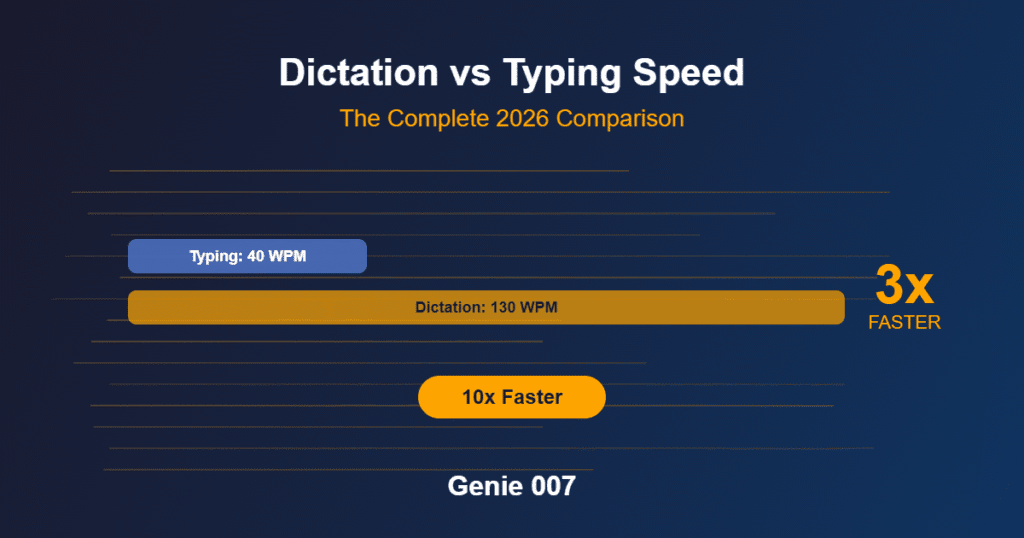
If you want to know how to dictate a book, you are asking one of the most practical questions in modern writing. Voice-first authorship has moved well beyond the early-adopter stage — today it is a mainstream workflow used by thriller writers, nonfiction authors, and indie publishers who need consistent output without burning out at the keyboard. The speed advantage alone makes a compelling case: the average person speaks at around 150 words per minute, while most writers type at 38–40 WPM. That means dictation is roughly three times faster, and that gap compounds dramatically across a 90,000-word manuscript.
This guide covers the complete process: the hardware you need, how to set up a sustainable daily dictation workflow, how to edit the resulting draft efficiently, and where the ceiling of standard transcription sits. It also introduces a newer approach — think-to-text AI — that handles structure and formatting automatically, so you stay in the creative flow rather than issuing voice commands to manage punctuation and paragraph breaks.
Whether your goal is to write a book by voice for productivity reasons, to manage a physical limitation that makes long typing sessions difficult, or simply to finish the novel that keeps stalling at chapter three, the workflow below is designed to get you there.
Why Authors Choose to Dictate a Novel
The productivity case for dictating a novel is grounded in real physiology. Natural conversational speech runs at 120–150 words per minute for most adults, while the global average typing speed sits at roughly 40 WPM — a 3x speed differential that reflects not skill differences but the fundamental design of the human vocal system. Publishing industry research into author output consistently shows that dictation is the single highest-leverage change working writers can make to their daily word count.
In practice: if typing 1,000 words takes around 25 minutes, dictating the same material takes approximately eight minutes — a saving of 17 minutes per thousand words. On a 90,000-word novel, that is more than 25 hours of active composition time recovered on the first draft alone, before accounting for the cognitive energy difference between grinding at a keyboard and speaking freely.
Science fiction author Kevin J. Anderson has written more than 180 books — sixteen million words in total — almost entirely by dictating into a portable recorder while hiking in the mountains. He reports 6,000–10,000 words on a productive dictation day, a pace most keyboard writers would need a full week to match. His output is a widely cited benchmark for what structured dictation delivers at professional scale.
The qualitative shift is equally significant. Many authors find that dictated prose carries a more natural, conversational rhythm than typed drafts. The self-editing voice that causes keyboard writers to second-guess every sentence tends to quieten when you speak — the story moves forward more fluently, and the revision pass later handles any roughness. For genre fiction in particular, where narrative pace and authorial voice carry enormous commercial weight, this qualitative difference often shows up in the finished work.
The Hardware You Need to Dictate a Book
You do not need expensive equipment to get started. The minimum viable setup is a dedicated microphone, a quiet workspace, and a device capable of running dictation software. Here is what each element means in practice.
Microphone
A USB headset microphone is the most practical starting point for most authors. The directional pickup pattern keeps background noise to a minimum, and the consistent mic-to-mouth distance means your dictation software receives a clean, stable audio signal session after session. Budget £30–£60 for the hardware — beyond that, quality improvements become marginal for dictation purposes rather than studio recording.
If you prefer to dictate while moving — walking, pacing, or even on a familiar commute — a handheld digital voice recorder or your smartphone’s voice memo app will serve well. You record the session, then import the audio into a transcription tool for conversion. This two-step approach suits writers who think more clearly in motion. Many prolific dictators report that walking routes produce their best material, because the physical act of moving forward seems to help the narrative move forward with it.
Avoid built-in laptop or desktop microphones for extended dictation sessions. They pick up fan noise, keyboard vibration, and ambient room sound in ways that increase transcription error rates and force additional correction time downstream. Even a basic external microphone produces measurably cleaner results.
Environment
A quiet room matters as much as microphone quality. Close windows, turn off fans and air conditioning where practical, and let others in the building know you are recording. Hard surfaces reflect and layer sound; a bookshelf, curtains, or even a folded blanket nearby will absorb reverberation if your workspace is particularly echoey.
For Windows authors exploring free starting points before committing to a paid tool, the guide to free speech-to-text on Windows 11 covers what is available without additional spend, including setup steps and accuracy comparisons across built-in and third-party options.
Choosing Your Dictation Software
The software you choose shapes the dictation experience as significantly as any hardware decision, and the options differ more than their marketing descriptions suggest.
Built-in operating system tools are free and have improved substantially in recent years. For casual or experimental sessions, they are effective enough to establish whether dictation suits your writing process before you invest further. The meaningful limitation is that most built-in tools require manual punctuation commands — you must say “full stop”, “comma”, and “new paragraph” as you speak, which interrupts narrative flow and forces you to think about formatting during composition rather than storytelling. That mental split is the primary reason first-time dictators abandon the habit.
Dedicated dictation tools designed for authors go further, offering custom vocabulary lists for character names, invented terminology, and genre-specific language. This vocabulary training — typically a few sessions of reading calibration texts — pays back quickly in reduced correction time across longer manuscripts.
The Genie 007 Windows app operates inside any word processor or writing environment without switching tabs or copying between applications. For authors who write in Word, Notion, or Google Docs, this in-context operation removes the friction that causes many writers to abandon the dictation habit in the first few weeks — the tool works where you already are, rather than requiring you to change your environment to suit the software.
Building a Dictation Workflow That Actually Works
The authors who sustain a productive dictation practice over months and years share a common characteristic: they prepare before they open the microphone. The failure mode for most first-time dictators is attempting to compose and navigate structure simultaneously in real time — it produces meandering drafts and frustration, and usually ends with the writer concluding that dictation is not for them when the real issue was preparation.
Outline before you speak
You do not need a scene-by-scene breakdown. A chapter-level outline — knowing which characters are present, what the central conflict is, and where the scene ends — gives your voice something to follow. Pantsers can use index cards — one per chapter. The goal is to eliminate the “what happens next?” pause from the session itself, because that is where flow collapses.
Build a consistent speaking environment
Some authors dictate from a standing desk; others walk a fixed route. Movement helps many writers access a more natural, less self-conscious speaking rhythm. Whatever environment you choose, the key is consistency — recording in the same space each session keeps your dictation software’s audio profile stable and accurate.
Say everything, edit nothing in real time
The most common mistake new dictators make is stopping mid-scene to correct themselves. Treat the recording as a performance: commit to each sentence, let imperfect phrasing stand, and keep the narrative moving. When you think of a continuity note or a detail to check later, say “AUTHOR NOTE:” followed by the thought — most dictation tools allow you to flag or search for these easily. Do not stop the session to deal with them live.
Train your punctuation ear
Standard transcription tools require you to verbalise all punctuation: “He looked up comma startled full stop new paragraph She had not moved full stop”. This feels awkward for two to three weeks, then becomes automatic. Short daily practice sessions — five to ten minutes of structured punctuation dictation before tackling full scenes — accelerate the transition considerably. It is a learnable technique, not a natural talent.
Review the session on the same day
A dictated session reviewed on the same day requires far less correction time than one left for a week. Your spoken phrasing is still fresh in memory, making it straightforward to reconstruct intent from an imperfect transcript. Build the same-day review into your session time rather than treating it as a separate task that gets perpetually deferred.
Editing a Dictated Manuscript
Dictated first drafts have a distinctive error profile that differs from typed manuscripts, and editing them efficiently requires a slightly different approach to the revision pass.
Homophones are the primary hazard. Standard spellcheckers miss errors such as “there” for “their”, “rein” for “rain”, or “chord” for “cord” because the words are spelled correctly — they are simply the wrong word. A read-aloud editing pass, either by reading the draft aloud yourself or using your software’s text-to-speech function, catches these far more reliably than a visual scan of the page.
Dictated prose runs long. Speech habits — filler phrases, doubled constructions, “and then she” patterns — make it into the transcript. A structural edit that prunes these without touching the underlying cadence produces tighter prose while preserving the natural rhythm that makes dictated writing distinctive and, in the best cases, unusually readable.
Formatting requires cleanup. Chapter headings, scene breaks, dialogue attribution, and paragraph structure need manual attention if your dictation software captures plain text only. For authors who also dictate across other professional contexts — client emails, meeting notes, reports — the same cleanup overhead applies across the whole workday. The guide to AI voice assistants for small business covers how voice-first professionals manage this across multiple tools and contexts simultaneously.
Beyond Transcription — Write a Book by Voice the Smarter Way
Standard dictation has a genuine ceiling, and it is worth being direct about where it sits.
Transcription tools convert your audio to text. That is all they do. They do not understand that “next chapter, we pick up the morning after, he is in the kitchen, something feels wrong” should become a formatted chapter heading, a scene-setting paragraph with descriptive detail, and a new section break. They produce words as you said them, punctuation and structure included only where you explicitly called them out — so the more intent-heavy your speech, the wider the gap between what you said and what you meant.
Think-to-text is a fundamentally different model. Rather than converting speech to text literally, it interprets your intent and produces structured, formatted output. Genie 007’s think-to-text approach means you speak the way you naturally think — incomplete sentences, mid-thought redirections, the actual texture of creative thinking — and the output arrives as polished, formatted prose without manual punctuation commands or structural cleanup afterwards.
For authors, this changes the composition pass significantly. You are not managing a transcription tool while simultaneously trying to write a novel. You speak the scene, the AI produces the text. Punctuation is handled automatically. Paragraph breaks appear where they belong contextually, not just where you remembered to say “new paragraph”. The cognitive overhead that forces writers back to the keyboard for structural work is removed from the dictation session.
| Feature | Standard Dictation | Genie 007 Think-to-Text |
|---|---|---|
| Punctuation handling | Must be spoken aloud | Automatic |
| Formatting output | Manual cleanup required | Context-aware |
| Languages supported | Typically 1–5 | 140+ |
| Works inside writing apps | Varies by tool | Yes — no tab switching |
| Interprets intent | Literal transcript only | Yes |
Genie 007 is available for Windows, Mac, mobile, and as a browser extension — it works inside the writing environment you already use. Plans start from £5 per month; see the pricing page for the full breakdown and a free trial with no credit card required.
Frequently Asked Questions
Is dictating a book faster than typing?
Yes, for most writers. The average person speaks at 120–150 words per minute, compared to a typing average of 38–40 WPM — making dictation approximately three times faster for first-draft output. The speed advantage narrows during editing (transcription errors require correction time), but authors who establish a consistent dictation workflow produce significantly more words per day than keyboard-only writers across a complete manuscript.
What equipment do I need to dictate a book?
The minimum is a USB headset microphone (£30–£60), a quiet room, and dictation software or a voice-enabled word processor. A handheld voice recorder or smartphone works well for authors who prefer to dictate while moving. Laptop built-in microphones produce too much ambient noise for reliable sustained dictation — an external microphone consistently improves accuracy and reduces correction time in the editing pass.
How do I edit a book I have dictated?
Dictated drafts need a targeted editing approach: use a read-aloud pass (yourself or text-to-speech) to catch homophones that visual spellcheckers miss, trim speech fillers and redundant constructions, and clean up any formatting the transcription tool did not handle automatically. A same-day review after each dictation session — while the audio is still fresh in your memory — substantially reduces the overall editing burden compared to leaving it for later in the week.
Do I need an outline to dictate a novel?
Not a detailed one, but some preparation significantly improves the quality of dictated prose. A chapter-level outline — knowing the scene’s core conflict and endpoint before you open the microphone — prevents hesitation and narrative wandering that produce transcripts requiring extensive structural editing. Pantsers can use loose story maps or index cards rather than formal outlines, and still benefit from knowing the destination of each session before they start speaking into the mic.
Try Genie 007 Free
If you have been putting off learning how to dictate a book because the setup seemed complicated, this guide has shown that it is not. The hardware is accessible, the workflow is learnable in a few weeks, and the jump from basic transcription to AI that understands what you are trying to write is the difference between a useful tool and a professional-grade one.
Download Genie 007 free — available for Windows, Mac, mobile and as a browser extension. No credit card required.
Written by Bill Kiani, founder of Genie 007.