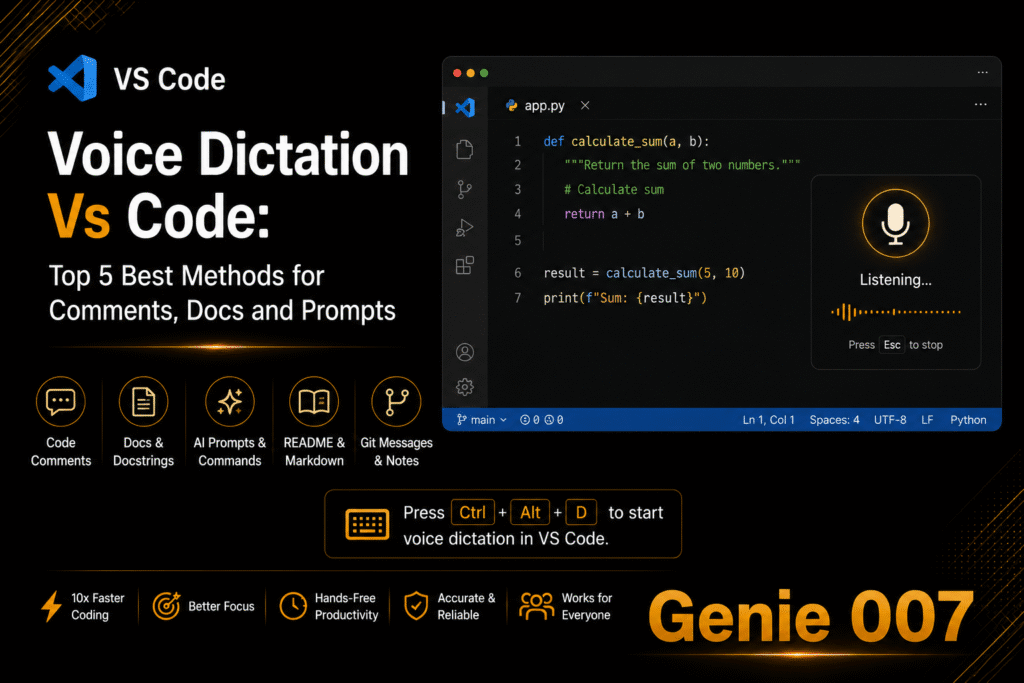
Voice dictation for developers is transforming how engineers work. It is not about coding by voice — it is about removing the writing bottleneck that exists around code. Most developers type at 80 to 100 words per minute in their editor. Voice dictation for developers fixes the bottleneck outside the editor. But outside the editor — in Jira, Confluence, GitHub, Slack, email, and documentation — they drop back to 40 words per minute like everyone else, typing slowly through tasks that are adjacent to their real work. Voice dictation for developers targets exactly this gap.
Genie 007 is available as a Chrome extension, a Windows desktop app, and a Mac desktop app — which means it covers VS Code, GitHub in the browser, Jira, Confluence, Notion, Slack, and any other tool in the developer stack. It is not a transcription tool. Genie Mode — Genie 007’s context-aware AI layer — reads what is on your screen and acts on intent. Say “write a PR description for this branch” and Genie 007 reads your diff and writes a complete, well-structured pull request description. Say “write a Jira ticket for the bug I just described” and it creates the ticket with acceptance criteria and reproduction steps. Voice-to-action, not voice-to-text. See the full AI voice commands guide for more examples.
Why Voice Dictation for Developers Makes Sense
The speed argument is well-established: speaking at 130 to 150 words per minute versus typing at 40 words per minute for non-code writing. But there are three deeper reasons voice dictation benefits developers specifically:
Flow state preservation. Every time you switch from coding to typing documentation, tickets, or messages, you break the mental state that makes deep technical work productive. Voice dictation lets you capture what you need to communicate without fully context-switching. Speak quickly, get back to the code.
Longer, better AI prompts. Developers working with Claude, Cursor, ChatGPT, or Copilot benefit enormously from giving longer, more detailed prompts. Typing a detailed prompt takes time most developers skip — they write shorter prompts and get worse results. Speaking at 150 WPM, the detailed prompt takes 20 seconds. Genie 007’s 99.5% accuracy across 140 languages means technical terminology transcribes correctly every time.
Hands-free documentation. Documentation is the task developers push to the end of every sprint and then rush through. Speaking documentation while reviewing code — reading and narrating simultaneously — is faster and produces more thorough docs than switching between reading and typing.
Setting Up Voice Dictation for Developers with Genie 007
Setup takes under five minutes and does not require any changes to your existing tools:
Step 1: Install Genie 007 for your environment. For browser-based tools (GitHub, Jira, Confluence, Linear, Notion, Slack in browser): install the Chrome extension. For desktop apps (VS Code terminal, desktop Slack, desktop Notion): install the Genie 007 Windows or Mac desktop app. One account covers all platforms.
Step 2: Add your technical vocabulary. Code frameworks, library names, variable naming conventions, project-specific terminology, team member names — add these to Genie 007’s custom vocabulary. The base accuracy is 99.5% across 140 languages, but custom vocabulary makes technical term transcription essentially perfect.
Step 3: Set your tone to “technical/factual” for documentation and tickets. Genie 007’s tone control ensures PR descriptions, commit messages, and docs come out in the right register — precise and direct, not flowery.
Step 4: Learn the three core Genie Mode commands for developer workflows: “write a PR description,” “write a ticket for,” and “write documentation for.” Each becomes faster to use over the first week as Genie 007 learns your context patterns.
Prompt Patterns That Work for Developers
Five real examples — what you say, what appears:
“Write a PR description for the authentication refactor.” Genie 007 reads the GitHub diff visible on screen and produces a complete PR description with What Changed, Why, How to Test, and any breaking change notes — structured exactly as your team expects.
“Write a Jira ticket for the login page timeout bug.” Genie 007 reads any context visible on screen and produces a ticket with Title, Description, Steps to Reproduce, Expected vs Actual Behaviour, and Environment — saving the 8 minutes most developers spend building this manually.
“Write a README section explaining this authentication flow.” Point Genie 007 at the relevant code file, give the command, and get a clear plain-English explanation of what the code does — in the tone and format of a professional README.
“Write a commit message for these changes.” A two-second spoken command produces a clean, conventional commit message that would pass any PR review. No more “fix stuff” commits.
“Write a Slack message to the team explaining why deploy is delayed.” Context-aware communication — Genie 007 sees what you are working on and writes a professional, specific message rather than a generic apology. Pairs well with voice typing in Slack for all team communication.
Handling Technical Terms with Voice Dictation for Developers
Voice dictation for developers runs into one common challenge: code syntax. Camel case variable names, function signatures, and code-specific formatting are difficult for any voice tool to produce accurately. Genie 007 handles this better than generic dictation tools through custom vocabulary, but the practical guideline remains: use voice dictation for prose (documentation, tickets, PR descriptions, emails, comments) and keyboard for actual code syntax.
The exception is AI prompt writing. When writing prompts to Claude, Cursor, ChatGPT, or Copilot, the output is natural language — and longer natural language prompts consistently produce better AI responses. Voice dictation dramatically lowers the friction of writing detailed prompts, which directly improves the quality of AI-generated code suggestions you receive back.
Privacy for Developers
Code is often the most commercially sensitive asset a company has. Genie 007 processes all voice input locally on your device. No code, no architecture decisions, no internal project details leave your machine. No audio is stored. Genie 007 is GDPR compliant and HIPAA ready — relevant for developers at health, legal, or financial technology companies where code confidentiality is contractually required. Full technical security details on the security and privacy page.
Frequently Asked Questions
Can voice dictation actually help developers write better code?
Indirectly, yes. Voice dictation does not produce code syntax directly — but it dramatically improves the quality of AI prompts sent to tools like Claude, Cursor, or Copilot. Longer, more detailed spoken prompts (easy to produce at 150 WPM) produce better AI code output than the short typed prompts most developers write when typing feels like friction.
Does voice dictation work in VS Code?
Genie 007’s desktop app works with VS Code on both Windows and Mac. It works best for writing in the terminal, code comments, documentation, and inline prompts — rather than for dictating code syntax itself. VS Code’s built-in speech extension has limited accuracy for professional use; Genie 007 is significantly more capable.
What is the accuracy of voice dictation for technical terminology?
Genie 007 achieves 99.5% base accuracy across 140 languages. With custom vocabulary additions — framework names, library names, variable naming conventions, team-specific terms — accuracy on technical terminology is effectively perfect. Add your stack vocabulary once; it applies across all your voice sessions.
Does voice dictation for developers help with documentation?
Yes — and this is where developers see the biggest time gain. Speaking documentation while reviewing code is faster than switching between reading and typing. A README section that takes 20 minutes to write by keyboard takes 5 minutes to speak, and Genie 007 structures the output appropriately without producing a raw transcript.
Is voice dictation suitable for developers who work with multiple languages?
Yes. Genie 007 supports 140 languages with 99.5% accuracy and includes automatic mid-sentence language detection. Developers who work across multiple spoken languages — common in international teams — can switch languages naturally and Genie 007 detects and transcribes correctly.
Voice dictation for developers targets the writing that surrounds code — the tickets, PRs, documentation, messages, and prompts that consume more time than most developers admit. Speak them. Ship faster.
Install Genie 007 Free → Add voice dictation to your developer workflow today. No credit card required.
Written by Bill Kiani, founder of Genie 007.