AI dictation software has moved well beyond basic speech-to-text. The best tools in 2026 do not just transcribe what you say — they understand context, infer intent, and help you produce polished output from brief spoken instructions. If you are still typing everything, or using a basic dictation tool from five years ago, this guide is for you.
We cover how modern AI dictation software works, which tools lead in 2026, what to look for when comparing them, and where Genie 007 fits in the landscape.
What AI Dictation Software Actually Does in 2026
AI dictation software does two things that older tools did not: it transcribes speech with very high accuracy, and it adds an intelligence layer on top of transcription. That second part is what separates modern tools from the basic dictation built into older operating systems.
Transcription accuracy for leading AI dictation software now sits between 95% and 99.5% for clear English speech in quiet environments. At 99.5%, a 1,000-word session produces roughly five errors — under a minute of correction. This is accurate enough for professional work without extensive post-editing.
The intelligence layer is more significant. Tools like Genie 007 read the context of the page you are on — the email thread you are replying to, the document you are editing, the form you are filling in — and use that context to help you produce better output. Instead of dictating every word, you give a brief instruction and the AI writes the full paragraph. That is the real shift in AI dictation software in 2026.
AI Dictation Software Comparison: Top Tools in 2026
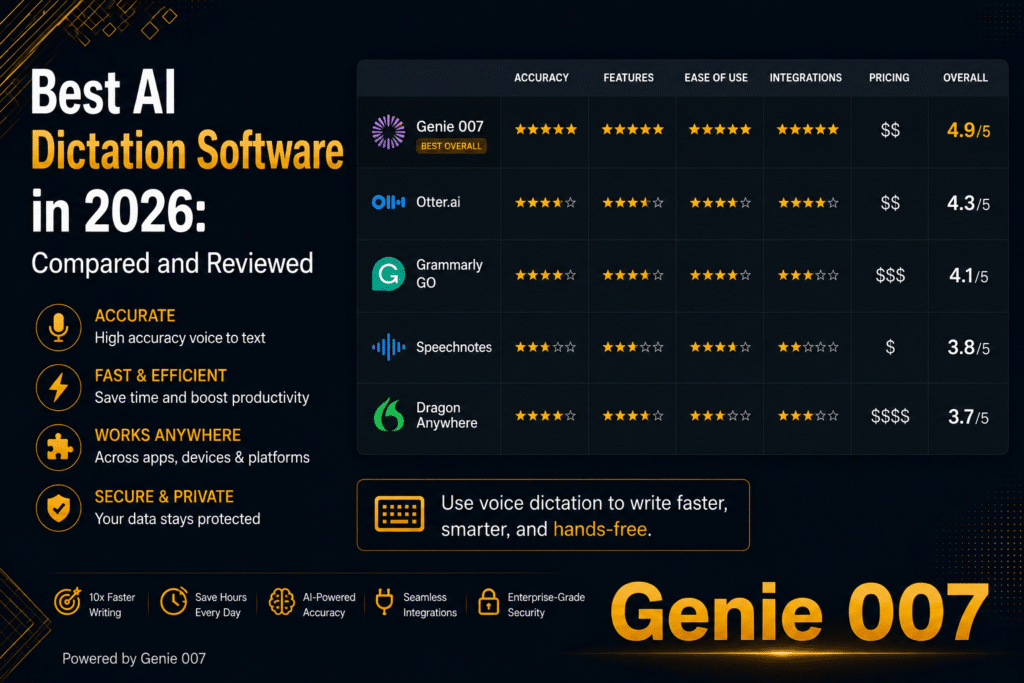
Here is how the leading AI dictation software tools compare on the dimensions that matter for professionals.
Genie 007: Context-aware AI dictation software that works in every text field in every browser tab. Press the activation shortcut, speak a brief instruction, and Genie 007 reads your current context and writes the output. Supports 140+ languages at 99.5% accuracy. Processes audio locally — nothing stored or sent externally. Free Chrome extension with paid tiers for heavy use. Best for: professionals writing across multiple tools daily.
Dragon Professional: The legacy standard in AI dictation software for enterprise use. Extremely high accuracy for trained profiles, especially with technical and medical vocabulary. Runs on Windows desktop, requires significant setup and profile training. Premium price point. Best for: medical professionals, lawyers, and enterprise users with dedicated desktop workflows and specific vocabulary requirements.
Whisper (OpenAI): Open-source speech recognition model with strong accuracy across many languages. Not a consumer product — requires technical setup or third-party wrappers. Best for: developers building AI dictation software applications or users who want a self-hosted transcription pipeline.
Apple Dictation: Built into all Apple devices. Works offline on newer Macs with on-device processing. Good accuracy for English, limited language support compared to AI dictation software leaders. Free. Best for: Mac users who need basic dictation within Apple apps.
Google Docs Voice Typing: Free, Chrome-only, basic transcription with no AI layer. Good enough for Google Docs first drafts. Does not work outside Google Docs. Best for: users who write primarily in Google Docs and want zero-cost dictation.
What to Look for When Choosing AI Dictation Software
Not all AI dictation software is equal. These are the criteria that actually matter for professional use.
Accuracy rate: The percentage of words correctly transcribed in normal use. At 95% accuracy, a 1,000-word session produces 50 errors. At 99.5%, it produces 5. The difference in editing time is significant at scale. Look for tools that publish independent accuracy figures, not just marketing claims.
Context awareness: Can the AI dictation software read your current document or email thread to help you write better output? Basic tools transcribe literally. Advanced tools like Genie 007 understand what you are trying to produce and help you produce it from a brief spoken instruction.
Platform coverage: Does it work across all the tools you use, or only within one app? AI dictation software that only works in Word or only in Google Docs creates friction. The best tools work in every text field in your browser.
Language support: If you work across languages or serve non-English speaking markets, language range and per-language accuracy matter. Genie 007 supports 140+ languages at 99.5% accuracy. Many tools claim multilingual support but degrade significantly outside English.
Privacy and data handling: Where is your audio processed? Who stores it and for how long? For professionals handling confidential work — legal documents, medical records, financial analysis, unpublished research — local audio processing is non-negotiable. Genie 007 processes audio entirely on your device. Full details at Genie 007 Security & Privacy.
How Genie 007 Approaches AI Dictation Software Differently
Most AI dictation software starts with transcription and stops there. Genie 007 starts with context and works backwards to the output.
When you activate Genie 007 in Gmail, it reads the email thread you are in. When you activate it in a Google Doc, it reads your document. When you activate it in a Notion page, it reads the block you are working in. Then you speak a brief instruction — and Genie 007 writes the output, informed by that context.
This is the difference between voice-to-text and voice-to-action. Voice-to-text produces a transcription of what you said. Voice-to-action produces the output you needed — the email reply, the next paragraph, the meeting summary — from a spoken brief.
Genie 007 works in every text field in Chrome, Edge, Firefox, and Arc. No switching apps. No separate dictation window. The AI dictation software layer appears wherever you write, across your entire browser workflow.
AI Dictation Software for Specific Professions
Different professions have different requirements from AI dictation software. Here is how the main tools align.
Legal professionals: Need high accuracy with legal terminology, local audio processing for client confidentiality, and the ability to dictate long-form documents. Dragon Professional or Genie 007 with its local processing model work best here.
Writers and content creators: Need cross-platform coverage, context-aware output quality, and speed at scale. Genie 007 is the strongest fit — the AI layer helps with first drafts, rewrites, and tone-matching that pure AI dictation software cannot deliver.
Students: Need free or low-cost tools that work across Google Docs, Notion, and email. Genie 007’s free tier covers most student workflows. Google Docs built-in voice typing covers the basics at no cost.
Sales professionals: Need fast note-taking in CRM tools, email drafting at speed, and multilingual support for international markets. Genie 007’s context-aware AI dictation software layer handles all three from a single browser extension.
FAQ: AI Dictation Software
What is the most accurate AI dictation software in 2026?
The most accurate AI dictation software in 2026 is Genie 007 for general professional use — 99.5% accuracy across 140+ languages with local audio processing and no setup overhead. Dragon Professional delivers comparable accuracy for trained profiles with specific technical or medical vocabulary requirements.
Is AI dictation software worth it?
AI dictation software is worth it if you write more than two hours per day. Speaking at 130 wpm versus typing at 40 wpm means you produce the same output in under a third of the time. Over a working year, that compounds to weeks of time saved. The break-even on any paid AI dictation software subscription is typically measured in days, not months.
Does AI dictation software work offline?
It depends on the tool. Dragon Professional and Apple Dictation process locally and work offline. Genie 007 processes audio locally on your device — your audio never leaves your machine — but the AI intelligence layer requires an internet connection for context-aware output. Cloud-based AI dictation software tools require a connection for all functions.
Can AI dictation software handle technical vocabulary?
Most modern AI dictation software handles common technical vocabulary well. Legal and medical terms may require custom vocabulary training in tools like Dragon. Genie 007 handles technical terminology across most professional fields without custom setup, including developer jargon, business terminology, and common specialist vocabulary.
How does AI dictation software handle accents?
Genie 007 is trained on diverse speech patterns and maintains 99.5% accuracy across 140+ languages and accent variations. Older tools like Dragon perform best with native speaker profiles trained to a specific accent. Google’s speech recognition handles a wide range of English accents well without profile training.
AI dictation software in 2026 is no longer a novelty — it is the fastest way to produce professional written output at scale. The gap between speaking and typing speed is permanent, and the tools are now accurate and intelligent enough for every professional workflow.
Ready to try the leading AI dictation software? Install Genie 007 Free → and start producing faster, better output from your first session.
For writers specifically, see the voice typing for writers guide. If you want to use AI dictation software in a sales workflow, see voice dictation for sales.
Written by Bill Kiani, founder of Genie 007.
Related Articles in This Series
- Voice Typing for Writers: How to Draft Your Best Work Faster
- Voice Typing for Students: Study Faster, Write Better, Score Higher
- Voice Typing in Google Docs: The Complete 2026 Guide
- Best Voice to Text Chrome Extension in 2026 — Full Comparison
Further Reading
For specific use cases around scripts, captions and social posts, the guide to voice typing for content creators goes deeper on those workflows.
For specific workflows around scripts, YouTube descriptions and social posts, the guide to voice typing for content creators goes deeper on those use cases.