Search “how to type faster” and you will find the same advice repeated across hundreds of articles: learn touch typing, memorise keyboard shortcuts, practise on a typing trainer. None of that advice is wrong — those techniques genuinely work and this guide covers all of them.
But there is a fact buried at the end of every one of those articles that most people never reach.
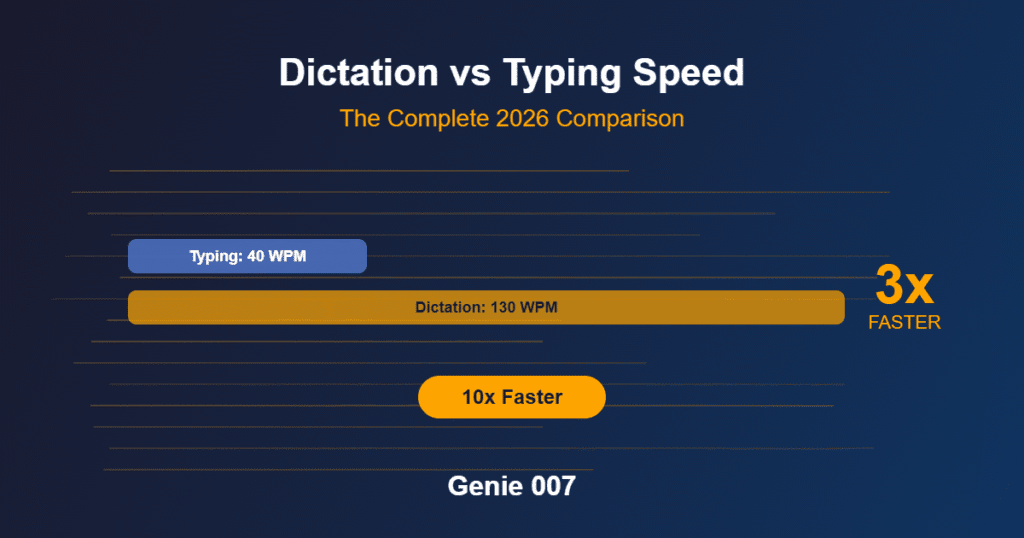
Even if you double your typing speed, you are still moving at a fraction of the pace your mind actually works. The average person types at around 40 words per minute. Elite typists — people who trained seriously and practise daily — reach 80 to 100 WPM. That sounds impressive until you compare it with speaking speed. Natural conversation runs at 130 to 170 words per minute. Typing at your very best still leaves you composing at barely half the speed you think.
That gap is where a remarkable amount of professional time quietly disappears every single week. This guide covers the genuine techniques for typing faster: touch typing, shortcuts, practice tools, and ergonomic changes. Then it covers the one upgrade that makes all of them look like incremental improvements.
What the Typing Speed Data Actually Tells You
Before chasing faster fingers, it helps to understand where you sit. Research drawn from millions of typing tests puts the global average at 40 to 52 words per minute. Office professionals typically land between 40 and 55 WPM. Trained touch typists reach 65 to 75 WPM, and professional transcriptionists can push into the 80 to 100 WPM range.
But the numbers that rarely appear in typing-speed articles tell the more important story:
- Fewer than one per cent of people type above 100 WPM consistently.
- Even at 80 WPM — a genuinely impressive achievement — you are composing at barely half your natural speaking pace.
- Average conversational speech runs at 130 to 170 words per minute, with a comfortable dictation pace around 150 WPM.
That 150-versus-40 ratio is not a rounding error. It is a structural bottleneck built into every email, report, and message you write each day. And no amount of touch-typing practice eliminates it.
How to Type Faster: Seven Techniques That Actually Work
These approaches are ordered from quickest wins to longest-term investments.
1. Learn (or relearn) the home row
The home row — ASDF for the left hand, JKL; for the right — is the foundation of efficient typing. Every time you strike a key, return your fingers to this position. Muscle memory builds fastest when your hands always know where to start.
2. Stop looking at the keyboard
Glancing down to find a key breaks your composing flow. Each look away costs you roughly half a second of reorientation. At 40 WPM you may be looking down twenty to thirty times per minute. Breaking that single habit typically adds five to ten WPM within a few weeks.
3. Use all ten fingers
Most self-taught typists use between six and eight fingers. Adding the ring and little fingers — particularly for the outer keys — distributes the workload and reduces how far each finger has to reach. The initial slowdown as you adjust is temporary; the long-term gain is not.
4. Master keyboard shortcuts
Keyboard shortcuts speed up your entire workflow, not just your sentences. The essentials worth learning:
- Ctrl+C / Ctrl+V — copy and paste without touching the mouse
- Ctrl+Z / Ctrl+Y — undo and redo instantly
- Ctrl+Backspace — delete an entire word in one keystroke (far faster than holding Backspace)
- Win+D — show the desktop and clear your screen
- Alt+Tab — switch between open applications without lifting your hands
Spend thirty minutes memorising the ten shortcuts most relevant to your daily work. That single investment repays itself every working day.
5. Use text expanders
A text expander lets you type a short abbreviation and have it expand into a full phrase or block of text automatically. Type “ty” and get “Thank you for your message — I will look into this and get back to you shortly.” For anyone writing repetitive email responses or standard templates, text expanders can effectively multiply the output of each keystroke.
6. Practise on a typing trainer
Structured practice builds speed far faster than unstructured daily typing. Focused drills target the weak fingers and specific letter combinations that slow you down. Twenty minutes of deliberate practice per day can move most people from 40 WPM to 60 WPM within six to eight weeks.
7. Consider an ergonomic keyboard
Standard staggered-row keyboards are a legacy of 19th-century typewriter mechanics, not human anatomy. Split keyboards and ortholinear layouts reduce finger travel and wrist strain. Many typists report meaningful speed gains after an initial adjustment period of two to three weeks.
The Ceiling You Will Eventually Hit
Typing speed improvements follow the law of diminishing returns. Going from 30 WPM to 50 WPM takes a few weeks of practice. Getting from 50 WPM to 80 WPM takes months. Reaching and sustaining 100 WPM consistently is a multi-year commitment that places you among fewer than one per cent of all typists worldwide.
And even then, you are still slower than speaking.
The evidence is consistent across research: average conversational speech runs at around 150 words per minute — roughly three times faster than the average typist. Even elite typists at 100 WPM are outpaced by a calm, ordinary conversation.
There is a point where optimising your fingers stops being the highest-leverage investment available to you. For most professionals, that crossover lands somewhere around 50 to 60 WPM. Beyond it, further typing gains become hard to notice in actual daily output. The biggest remaining gains do not come from typing faster. They come from not needing to type at all.
The Fastest “Typing” Upgrade Is Not Typing
Voice dictation has existed for decades, but its reputation was built on a frustrating experience: dictating every comma and full stop out loud. Saying “colon, new paragraph, best regards, comma, new line” defeated the purpose of speaking freely.
Modern AI voice tools have transformed this entirely. Today’s AI does not merely transcribe what you say — it interprets what you mean. Speak in natural, flowing sentences and the system handles punctuation, formatting, and paragraph structure automatically.
The productivity research backs this up. Studies consistently find that AI-assisted dictation runs at two to three times the speed of keyboard input for equivalent output quality. For the average professional, switching from typing to AI-powered voice input can recover an hour or more of active writing time each day.
Windows users have a few built-in options worth understanding — the native voice typing shortcut and Voice Access are both covered in detail in our guide to free speech to text on Windows 11. These tools are a legitimate starting point, but they carry real limitations: basic punctuation handling, no understanding of context or intent, and no meaningful integration with the professional apps where most work actually happens.
How Genie 007 Changes the Equation
Genie 007 is not a transcription tool. It is a think-to-text system — a distinction that matters enormously in everyday use.
With standard voice typing, you still have to dictate a reasonably complete sentence. With Genie 007’s Genie Mode, you speak the intent rather than the finished text. Say “write a follow-up email thanking the client for today’s call and confirming the next steps we agreed” and it produces a polished, professional message — not a rough transcript you have to edit afterwards.
That makes the output not just faster than typing. It is faster than most people can compose in complete, polished sentences.
The two modes cover different workflows:
- Voice Typing mode: speak naturally and get punctuated, formatted text instantly — no dictating punctuation aloud, no cleanup required
- Genie Mode: share the idea or the intent and receive the finished LinkedIn post, cold email, Slack message, or meeting summary
Genie 007 works inside the apps you already use — Gmail, Outlook, LinkedIn, Slack, Teams, Notion, and dozens more — with no tab switching and no copy-pasting. It is available as a Windows app, a Mac app, on mobile, and as a browser extension.
Individual plans start from £5 per month with a free trial and no credit card required. The Teams plan costs £8 per user per month, with pooled credits and an admin portal for managing seats.
More than 1,200 clients already use Genie 007. An operations director cut two hours of daily inbox time to under twenty minutes. A business development manager doubled booked meetings within six weeks. Genie 007 supports over 140 languages and processes everything with AES-256 encryption — your content never touches Genie 007’s servers.
If you are evaluating voice tools for a team, our guide to dictation software for small business covers the key considerations — from accuracy and privacy to how team licensing works in practice.
Frequently Asked Questions
How long does it take to improve typing speed?
Most people see meaningful gains — ten to fifteen WPM — within four to six weeks of consistent daily practice. Moving from 30 WPM to 60 WPM typically takes two to three months. Reaching professional speeds above 80 WPM generally requires six months or more of dedicated training.
Does touch typing actually make you faster?
Yes, consistently. Touch typists outperform hunt-and-peck typists in both speed and accuracy. The advantage comes from muscle memory: when your fingers know where each key is, your attention stays on what you are composing rather than where to find the letters.
Is voice typing faster than keyboard typing?
For most people, yes — significantly so. Average speech runs at around 150 words per minute versus a global keyboard average of 40 to 52 WPM. Even for trained typists the gap remains substantial. With an AI voice tool that interprets intent rather than literal dictation, the practical advantage is larger still.
Will AI voice tools replace keyboards?
For many everyday tasks — emails, messages, reports, social posts — AI voice already represents a faster and lower-effort alternative. Keyboards remain better suited to precise tasks such as coding, spreadsheet entry, or anything requiring exact cursor positioning. Most professionals will find the two complement each other rather than one replacing the other.
Ready to Type 10x Faster Without Typing?
Stop optimising your fingers and start working at the speed of thought. Genie 007 turns your voice into polished emails, messages, and posts — instantly, inside every app you already use.
Written by Bill Kiani, founder of Genie 007.